
Would it be meta if I did a deep dive analysis of this post on my study blog or did we cross the meta threshold when I commented how meta it would be?
3 Likes
U wot m8
12 Likes
Great!  Now just eagerly awaiting the release of My Cute Lil Deck
4 Likes
Of course you have a bunny related deck. I just saw it.
XD
2 Likes

I made the Apple Deck from the initial Decks release post (and spent way too much time in it), but I think someone else might have to make the cute little deck.
2 Likes
While I do appreciated the filter for swearwords, I am unable to include the word “assumes” in the description of my deck (due to the ass-word) XD
5 Likes
What is the best way to approach making a Deck for a book? So far I’m kind of trying to include most nouns and any N3+ grammar that I encounter (if possible), but is it better to just include anything that Bunpro has to offer? Or do people just set a minimum Nx requirement to reading the book anyway, and exclude anything that is below the requirements?
I’m currently partially making it for myself, where I want to publish it in the community deck tab once it’s finished, so I would like to make it as useful as possible without being a clutter of already known, common words.
Also, how would I go about including words that are not in BunPro? Or is that impossible due to BunPro not being able to verify whether those translations are correct.
2 Likes
I am unable to include the word “assumes” in the description of my deck (due to the ass-word) XD
Fixed! You can now add as many asses as you like (within reason).
Also, how would I go about including words that are not in BunPro? Or is that impossible due to BunPro not being able to verify whether those translations are correct.
Adding custom Vocab to Bunpro is not possible.
We have recently improved the Vocab search tho, so maybe try searching again for missing words!
1 Like
Will there be a feature to edit vocabulary after we save? I manually check everything before adding it, but there are things I miss or I just don’t notice. For example, in my Meta Gear Solid deck, I added the word 昇降. But I didn’t notice until I replayed the game again that it should have been 昇降機. But I can’t edit that word now.
1 Like
Unfortunately currently you have to manually remove the word and then replace it through the Edit (/edit) screen.
I’m sure we’ll add this feature eventually.
1 Like
Assmazing 
That’s ok. I’ve only encountered one term so far, and it was very easily deducible from context. I am actually quite impressed with the search system, it finds things I’m looking for, that I didn’t expect it to find
2 Likes
Something I noticed on desktop:
Initially all community decks show a 0% completion even if I already learned items from it by doing other decks. However, if I open the deck and then reload the decks’ dashboard, now they update the progress bar. Is this by design? Even if I am not learning a specific deck, I like to look at the completion bar to have an idea of how far I am from being able to understand vocab in an anime or manga, for example.
Here is one of them before I clicked the deck:
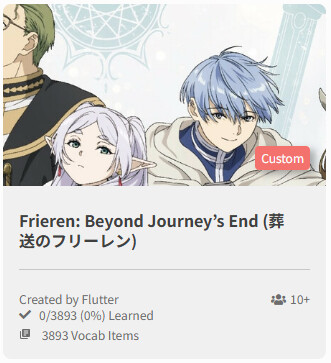
And after clicking:
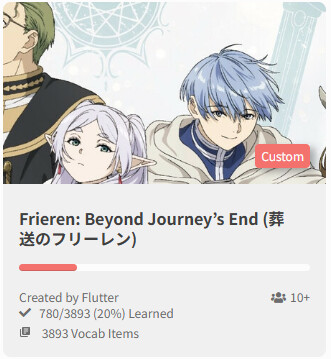
I didn’t add the deck to my learning queue or did anything else.
1 Like
There should be a refresh icon when you hover over the card, which lets you update the progress within a deck based on the vocab and grammar you have studied on bunpro:
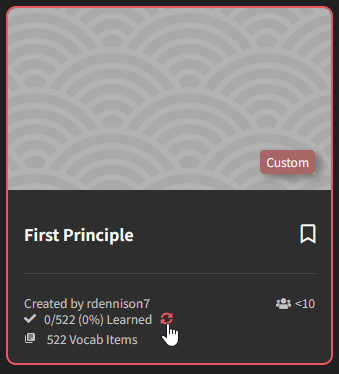
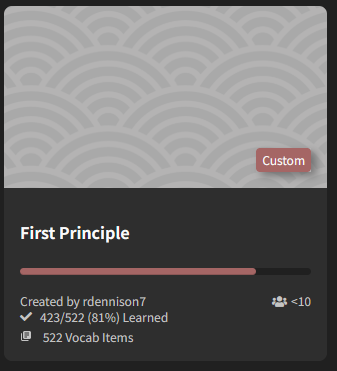
I imagine the reason for this is to avoid the decks page from loading slowly by trying to refresh all of the decks on page load. It is kind of fun going through a bunch of decks clicking them to see how your progress has improved in each deck’s material.
2 Likes
Wow, my deck in a screen grab. How cool!
2 Likes
So I’m missing the refresh button?
Edit: the refresh button does show up for decks that I previously opened!
On android the progress bar for every deck is automatically updated though
1 Like
Firstly, can I just say a huge thank you and hats off to the team for the vocab importer, it’s REALLY impressive! And I like the yellow marking for words that aren’t fully certain so you can check if it’s supposed to be a different word.
My guess is the next biggest feature request is going to be some way to include custom words. I know that’s probably a huge can of worms since it opens up a lot of potential issues, including database performance concerns over potentially adding a ton of words, quality control for words, etc. etc. But even if there were a way to add “deck only” words that didn’t show up in searches/bunpro-proper but only appeared as part of a custom deck, that would be really cool.
Just as a hypothetical example, I have been working on a Final Fantasy I vocab deck and there are many specialized words from the game. Some words are proper nouns, or combinations of words/grammar points, and others have equivalents that are either close enough or require multiple vocab words to get the same meaning, but being able to use the actual word instead of a close approximation or multiple words would be nice.
Examples: 1) a word that had a close approximate on bunpro and 2) a word that had to be broken up to use the best closes available amalgation of vocab words to equate to one word.
| Final Fantasy | meaning | → | Bunpro | meaning |
|---|---|---|---|---|
| ブリザド | Blizzard | ブリザード | ||
| 赤魔術士 | Red Mage | 赤 | Red | |
 |
魔術 | Black Magic, Sorcerery | ||
|
術士 | Tactician, Sorcerer |
2 Likes
Would love it if I can sort grammar points in a deck by their JLPT level! <3
1 Like
When I’m using the import function, the deck search seems to only import from the Vocabulary. Would it be possible for it to also suggest grammar points along with it? Sometimes I think I’m looking for a word, but instead there is an entire grammar point around it, which would be a way more versatile thing to learn rather than just that single use case of the applied verb.
For example, if I look for つづける from a sentence that for example has 描き続ける, it would be more useful to get the 続ける grammar point than the vocab of it.
2 Likes
Just an update for all that are interested:
I’ve created this Official Deck Creation Thread to help users keep track of changes related to Community Decks and the Deck-creation system overall.