
Find and recover items removed from review

I removed from review about 150 vocab items by mistake, is there any way to recover them?

I was editing a deck I created and I wanted to remove an entire section because it was wrong, so I clicked on “Remove All” thinking it would remove all items from the deck but instead it removed all items from my reviews.
I’m devastated because I don’t have the motivation to go back and check each item to see which ones I lost and what level they were before I removed them.
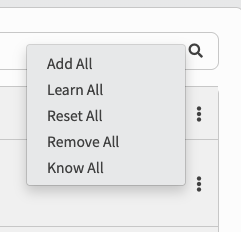
Screenshot 2026-02-05 at 18.52.27

1 Like

Hi there!

I’ll see what I can do.
What Deck and what unit (chapter) in the Deck was it?

I clicked on “Remove All” thinking it would remove all items from the deck but instead it removed all items from my reviews.

That is a fair enough assumption.
I’ll go in and change the wording to make it a lot clearer :pensive:

Sorry about this!

2 Likes

Hi Sean, thanks for helping! This is the deck. I clicked Remove All on both Chapters it has.
https://bunpro.jp/decks/uv3qrt/game-gengo-vocabulary-series

But after doing some more research here in the community, I saw that removing items from the review queue doesn’t reset their SRS level, so not everything is lost.

So I took some time to go through the items one by one and re-add the ones I remembered, and they kept their SRS level. I recovered almost everything.

The downside is that this makes the next review happen right now, even if the level is Seasoned. This not only causes a huge pile of reviews all at once, but also means some items might “cheat” up a level. That is because maybe in two months I wouldn’t remember them, but since the review is happening right now, they’ll go on to Expert today.

But despite this small inconvenience, I believe everything will be back to normal once I finish all these reviews.

2 Likes