How WaniKani, two failed JLPT attempts, and a pile of unread ebooks led me to Yomumichi

Hi everyone, I’m Mersad.

My Japanese-learning story started with someone else’s motorcycle trip.

I saw a couple travelling through Japan on their bikes and went down one of my usual rabbit holes. It inspired me enough that I got my motorcycle licence, bought a bike, and started thinking that one day I wanted to ride through Japan myself. I had already been interested in the culture for a long time, so learning Japanese somehow became part of that dream.

I researched everything I could find about learning Japanese and eventually landed on WaniKani. For quite a while, WaniKani was basically all I did.

At the time I didn’t know that I had ADHD. Once I was diagnosed, learning Japanese became important to me for another reason too. I wanted to prove to myself that I could stick with something genuinely difficult, and that this wouldn’t become another rabbit hole that fizzled out after a few months.

So I kept going. Later I added Bunpro, learned more grammar, and got to the point where I technically knew quite a lot of kanji and vocabulary. I also kept hearing the same advice: if you want to learn Japanese, you need to immerse. You need to actually use the language.

Watching anime was easy enough, but reading was the part I kept avoiding.

That became painfully obvious when I failed the N3. I could look at a text and recognize a surprising amount of it, but reading it took me forever. I knew the kanji, the vocabulary, even the grammar, and I still couldn’t get through a Japanese text at any useful speed.

People had told me to read more, and they were right. I tried graded readers and other learner material, but most of it just didn’t hold my attention. I read a lot in English and German, and I read a frankly ridiculous amount of manga, so the desire to read was never the problem. I wanted to read things I actually cared about. The learner material often felt like something I had to get through before I was allowed to read the interesting stuff.

Then I started buying Japanese ebooks and ran into the next problem. A sentence could turn into several minutes of looking things up, switching context, checking a translation, and still not really understanding why it was phrased the way it was. A normal translation told me what the sentence meant, but it often hid the Japanese structure that I was trying to learn. Even when I understood the result, it didn’t feel like much of the Japanese was sticking.

I kept wishing I had one place where I could just read the book and get help without leaving it.

That idea slowly became Yomumichi.

I’ve been working on it in my spare time for about two years now: thinking through how it should work, making prototypes, throwing things away, and trying again. I was building it mainly for myself. Failing the JLPT a second time was frustrating, but weirdly also validating. It confirmed that reading was the real problem, and it made me take the project much more seriously.

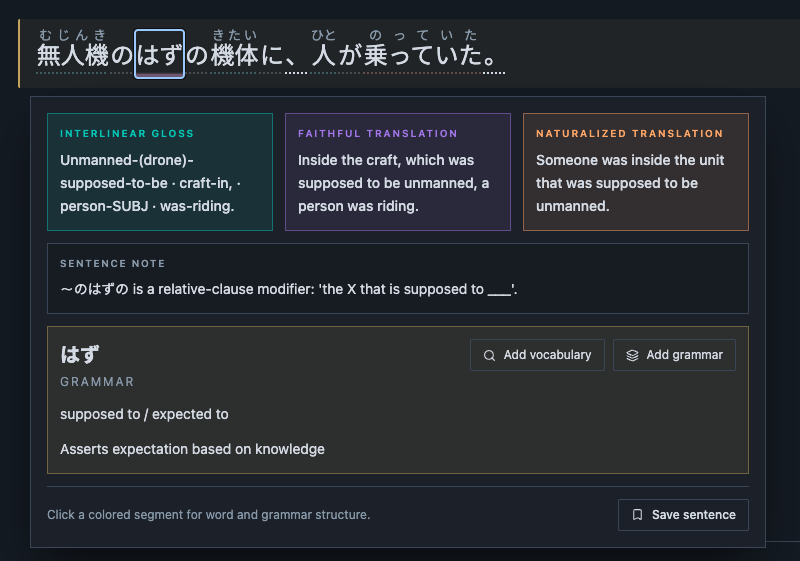
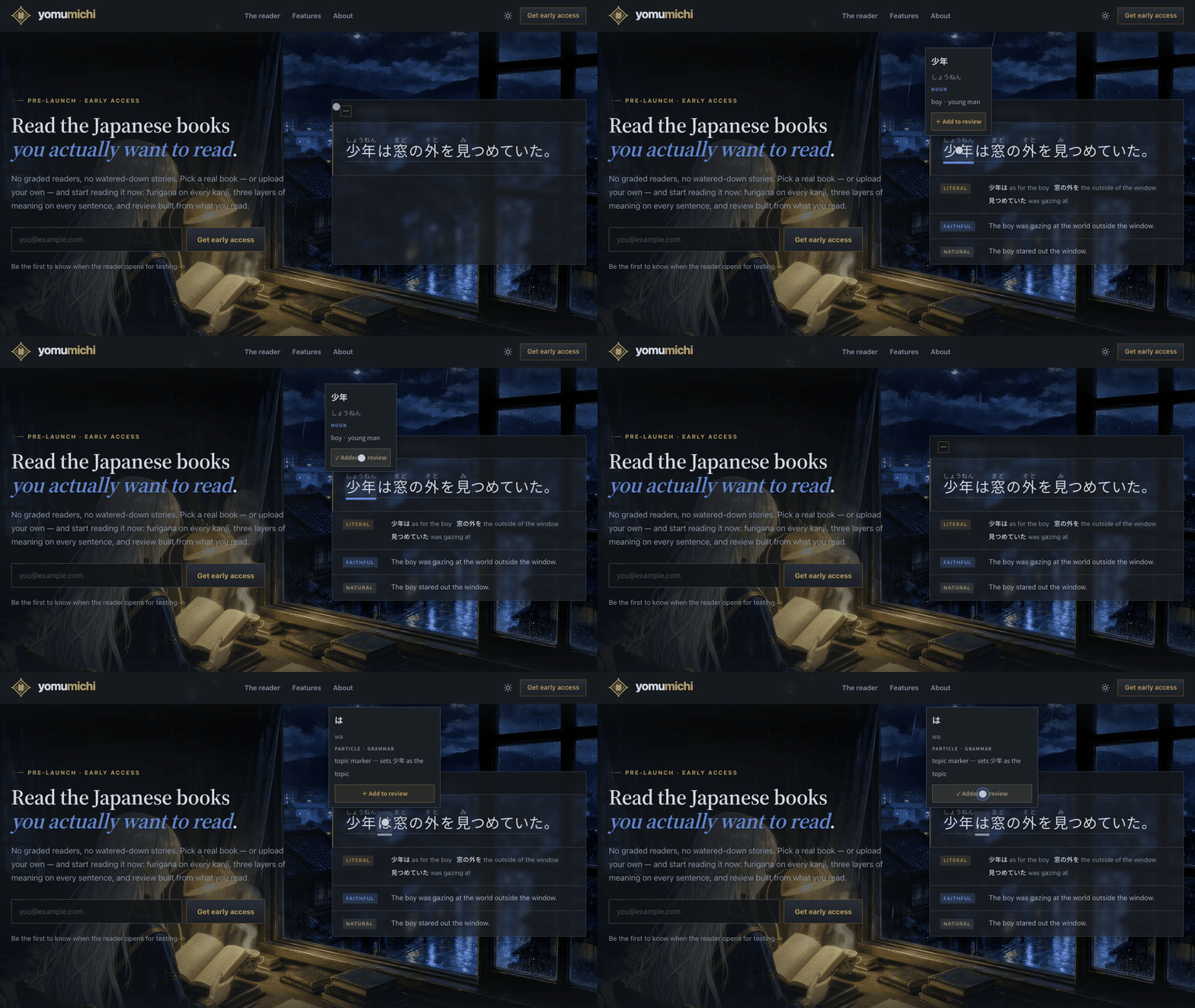
The basic idea is that you bring an ebook you actually want to read and Yomumichi prepares it for the reader. The Japanese stays in front of you with full furigana and instant lookup for words, kanji, and grammar. When a sentence still doesn’t click, there are different levels of help: a close look at how the Japanese pieces fit together, a more faithful translation, or a natural one.

I don’t want the Japanese to disappear behind the translation. I want to stay inside the book long enough to follow how Japanese actually puts the thought together, instead of constantly jumping out of the text or only reading the English result.

I also want things discovered while reading to remain useful afterwards. If a word or sentence is worth remembering, it should be easy to review it later in the context where it first mattered.
01-yomumichi-hero

Most of what you see here is still a prototype. The design, structure, and probably quite a few details will change while I turn it into a working Beta. These screenshots show what I’m building towards, not a finished app. Some parts are blurred on purpose because they’re either early ideas I’m not ready to show properly yet or book covers I’ve hidden for this post.
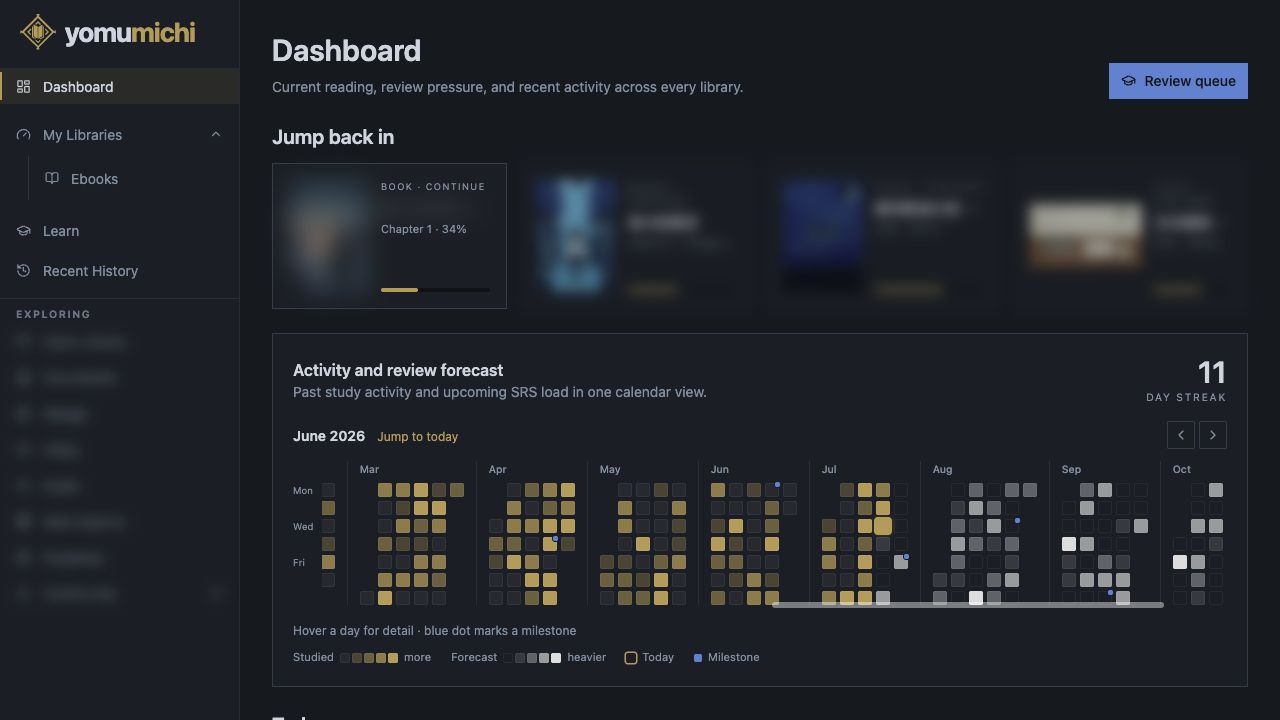
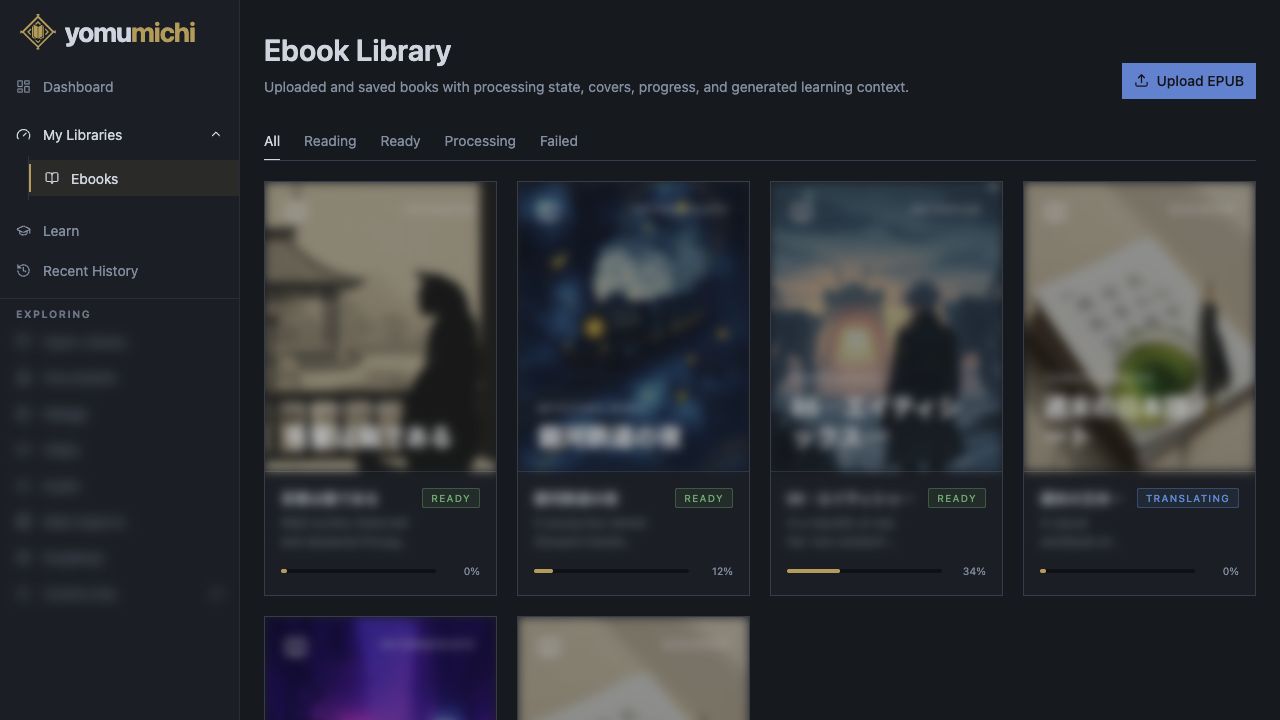
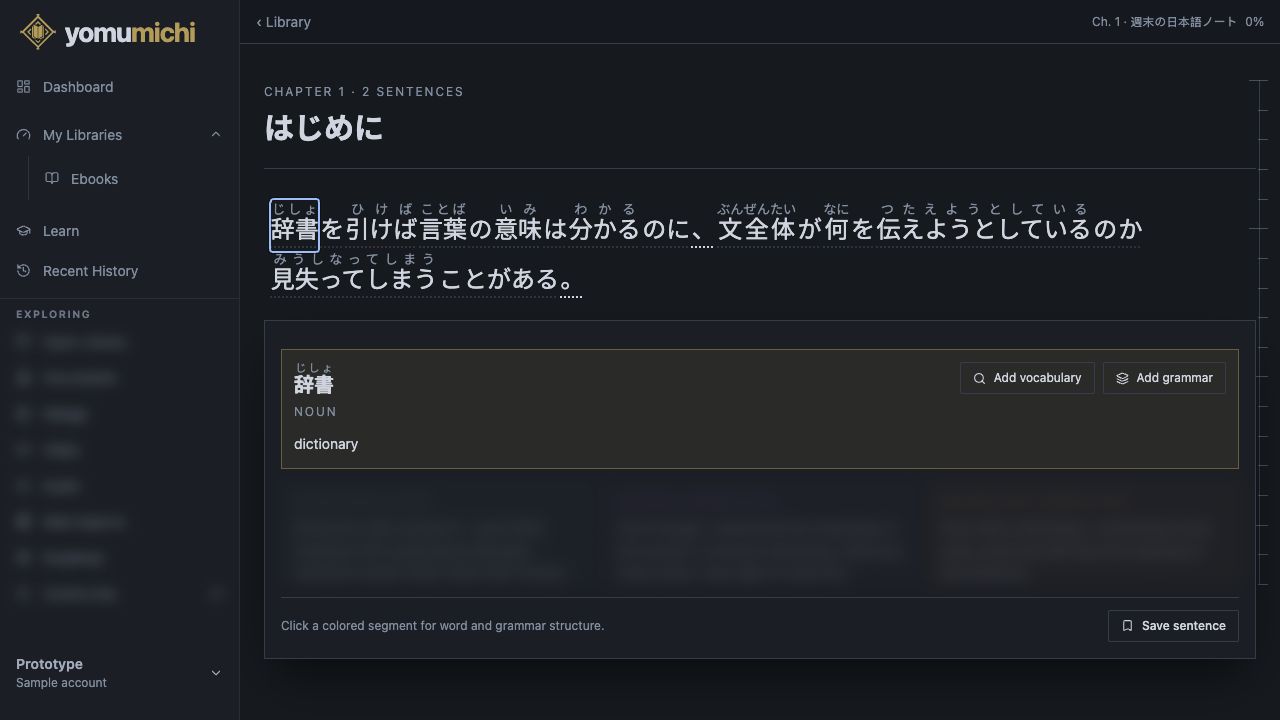
At some point I realized that this might be useful to people besides me. I’d really like to find out if that’s true rather than quietly building the whole thing around my own habits.

I’m planning a small private Beta where people can try it for free and tell me what helps, what’s confusing, and what still makes them want to close the book. You’ll be able to try your own compatible EPUB, but I’ll also include a few books that I can legally make available for the Beta, so not having an ebook ready doesn’t stop you from testing it.

If this sounds like something you’d actually use, you’re welcome to join the early-access list:

Join the Yomumichi early-access list

There’s no Beta date I can honestly promise yet. I’d rather invite people when there’s something worth testing and improve it with them from there. If people really like it, I might make a real product out of it. And if it turns out that nobody else needs this, that’s useful to know too. I’ll still have built the reader I need for myself.

I’d also love to hear about your own experience with reading Japanese, whether you’re reading books already, tried one years ago and stopped, or are still trying to make the jump. If you’d be comfortable having a short chat with me about how you read now, feel free to say so. No pressure either way; I’m happy to just talk here in the thread too.

That’s Shiori, Yomumichi’s mascot. You’ll probably see her peeking over words in the reader too.

P.S. I made an @yomumichi account where I’ll share updates as the project changes. I’m @mersad if you want to follow along as I build it or ask me something directly.


4 Likes

How are those translation done?
I suppose you are using a LLM ?
If so which is it and that means you are thinking of making your app paid in the near future or maybe not?
Will it be open source?
It looks like you are including a flashcard system in it too from the screenshot, can you sync it with anki ?
What is the big selling point of your app compare to all the other OCR or pop up dictionnary ones?

I am not trying to be rude, that’s a lot of work you poured into your app. Well done!
Just trying to find the appeal of it compare to all the other similar apps and getnsome clarification of what you are planning with it :slight_smile:

PS: Just a me thing but when I see an app with generated art I tend to assume it was also probably vibe coded (at least partly)… I do hope it’s not the case here and you might hire an artist later on for your mascot.

3 Likes

No worries at all—I invited people to ask questions, so none of this comes across as rude to me. And thanks for the kind words too.

Yes, the translations are done using LLMs. I obviously couldn’t do all of that work manually myself. Right now I run it through subscriptions I already have, so the costs are manageable for me. For the private Beta, I’ll cover the processing costs completely, so nobody participating has to worry about paying anything.

If I eventually make Yomumichi publicly available as a real product, then yes, it will probably be paid in some form. LLMs aren’t cheap, and I would need to find a way to make it available that is affordable for users but also sustainable and fair. Whether that becomes a subscription, some kind of credit system, different processing options, or something else isn’t clear enough yet. That’s something I’ll have to work out later.

I don’t plan to make it open source. I’ve already put a lot of time and money into it, and considering the scope of what I’m trying to build, open-sourcing it and then potentially providing installation help, maintenance, and support for free just isn’t feasible for me. It would be another large project on top of building Yomumichi itself, and at least right now it simply doesn’t make sense to me.

Regarding the flashcard system: I think having a review system connected directly to what you discover while reading is one of the most valuable additions I can build, so that is a core part of the plan.

Anki support won’t be available from the beginning, but I definitely have it in my internal feature pipeline. That could include exporting or synchronizing cards and supporting other imports later. Making it compatible with Yomumichi’s own review system may be a little more complicated, so I’ll have to look at it once the core features are implemented and I’ve collected more feedback. I do want to support it, but there are currently other systems that I believe will benefit readers more and therefore have a higher priority.

As for the difference compared with OCR tools or popup dictionaries: Yomumichi already includes instant word lookup, so it isn’t really one or the other. I consider that lookup a basic part of the reader.

What I want to build goes much deeper than a popup saying, “this word means that.” A word can mean something different depending on how it is used, so I want to make proper use of the context around it: the sentence, the chapter, and eventually the book as a whole.

That also applies to the different translation layers. I don’t just want a random translation or even one generically “accurate” translation. The close explanation, faithful translation, and natural translation each have a different purpose. Alongside that, I want vocabulary, kanji, grammar, reading, and later review to feel like parts of one connected system rather than several unrelated tools.

Because I’m a primary user myself, my standards for this are higher than simply adding an AI translation button. I also want to make Yomumichi more AI-native in other ways and provide more support around the actual reading process. I don’t want to reveal all of that yet, but it is meant to become more than a popup dictionary.

Regarding the artwork: yes, Shiori and the current visual assets are AI-generated, and I’m not trying to hide that.

I think AI image generation has come a long way and is very valuable when you need the amount of digital assets that an application like this could eventually use. The amount I would already have needed to pay someone for all the assets I currently have would simply not have been feasible for me.

Right now I’m taking care of that part myself with AI, and I think it is doing a good job as long as the quality is properly controlled. If an artist or designer ever joins the project, I think their value would be in directing the art, keeping everything coherent, and making sure it properly fits Yomumichi. That wouldn’t necessarily mean we would stop using AI-generated assets. We would probably use AI together as part of the process.

I don’t really want to turn this into the much larger discussion about AI replacing artists. I’m a developer and I use AI heavily in my own work, but I don’t feel replaced by it. It enhances what I can do. I would see it the same way for an artist working on the project.

And yes, I also use AI extensively while building Yomumichi. I won’t deny that. But I’m an experienced full-stack developer, and my current work also has a strong focus on AI. I understand and direct the internals, architecture, entities, and components rather than blindly accepting whatever a model generates.

I review the code carefully, I don’t simply push everything, and none of my changes enter the repository without being properly reviewed. I care a lot about clean code, maintainable foundations, and making sure this could eventually be worked on by more people without everything falling apart.

There is plenty of AI-generated slop and blindly vibe-coded software out there, and I really dislike that too. My technical standards are actually one of the reasons Yomumichi isn’t already available. AI can generate a lot very quickly, but I’m not interested in one-shotting something of this scope and hoping that it somehow holds together.

1 Like

This asset is really cute but I’d strongly advise getting someone to clean up those edges if you can’t do it yourself!

Your site looks really impressive ngl, just wondering what level learners are your target audience?

2 Likes

Thank you, I really appreciate that! And you somehow managed to point out the one part of the page that bothers me the most :joy:

I completely agree about the edges. I actually spent a couple of hours cleaning that asset up because it looked quite a bit worse before. I also have basically no experience with animation, so getting the movement to work at all was difficult for me. It looks the way it looks for now, but it can definitely be better.

I hope this becomes easier once I have a more reliable process for generating, cleaning up, and preparing assets. At the moment there is still quite a lot of manual work involved, especially with things like those edges.

Regarding the target level, my long-term answer is pretty much anyone who wants to learn Japanese. The goal is eventually to make it possible for people to enter Yomumichi at different stages of their learning journey.

For the first Beta, though, I’ll probably focus more on people who already know kana, have some vocabulary or grammar knowledge, and are actively interested in getting into Japanese reading. Maybe they have already tried reading something or have some material they want to read. I think those people will be able to test the core reader more directly and give me more useful feedback at the beginning.

But I definitely don’t want Yomumichi to remain something only for intermediate learners. Full furigana support is one of the most valuable parts of it to me. Once you know kana, you can at least begin decoding and reading Japanese text instead of waiting until you have learned enough vocabulary, grammar, or kanji to finally feel “ready.”

That obviously doesn’t mean a complete beginner will understand everything. They may initially need to look up nearly every word and will need much more support. But reading itself is also a skill. Becoming comfortable moving through Japanese text and increasing your reading speed takes practice, even before your comprehension is particularly strong.

That was one of my own problems. I spent a long time learning kanji, vocabulary, and grammar without reading enough. When I reached the N3, I realized that I technically knew quite a lot of what I was seeing, but I was still reading far too slowly. I think many learners postpone reading for too long and lose out on building that fluency early. This can already be valuable around N5 or N4—I just noticed the consequences much more clearly at N3.

So the larger goal is to create a proper on-ramp that gets people reading much earlier and helps bridge that gap between studying Japanese and actually using it. I have more planned around making that onboarding useful for early learners, but I don’t want to reveal too much of that yet.

1 Like

Thank you for the in depth reply, truly :bowing_man:

Very nice of you, maybe offer a free tier with only the popup dictionnary for people that want it?
Take your time to find the best and cheapest AI not to bloat the price.

That’s totally fine for such a product to use AI to start, it’s great you are thinking to hire an artist later on. You are right, gen ai image came a long way.
I don’t want another AI debate either haha
Just wanted to warn you that some user might think ai art mean your app might be vibe coded.

That’s great to hear, AI is great to help for coding but too many developper overely on kt.
Thank you for your transparency.

1 Like

Yes, I have been thinking a lot about what a free/low cost tier could look like. But all that is just in planning stages, and thinking about it too much right now does not make sense, considering where I am.

Haha, I think it will happen either way :joy: I don’t mind tbh, I want the app to speak for itself and I am making it for myself anyway, so all good.

1 Like

Mmmm as someone who has already spent too much time on WaniKani, I would prefer to be able to turn off the furigana according to my knowledge, just like on Satori Reader. The one thing I don’t like about apps like Satori Reader is that I can’t turn off the furigana manually for each word/kanji for those words whose kanji I have already learned outside of WaniKani. If there is no way to turn off the furigana, it would be a big no for me. And I know I could just ignore the furigana but my brain is lazy and if there something easier to read it will cheat inmediatly.

2 Likes

Seconding this, as a non wanikabi user I choose one level higher of the jouyou kanji I am currently studying in Satori reader but it’s not perfect. My brain is also lazy and crave furigana.

2 Likes

Already thought of that. There is a Furigana switch, since you can look up any word anytime it is not a big problem if you forgot one or two readings, just look it up. Down the line I even thought of making the whole interface Japanese, at least I thought it would be a cool endgame feature for late stage learners :slight_smile:

I got so much stuff cooking for later levels I really have to hold back haha

2 Likes

Hmm different levels of furigana support would help here right? I could combine it with the stages of the srs or chosen levels, hide it for the known stuff show it for the unknown…

1 Like

That could be an idea but it’s not a priority, having a furigana toggle is already great.

1 Like

Not related to the main thread, but you can manually add kanji to the known list in Satori reader, in the same place you import your known WK Kanji.

3 Likes