Just had progress for ~2400 cards reset by Bunpro, 6 days before the JLPT

Hello!

I’ve made a support request about this too, but as this is urgent I thought I would post as well (in case anyone else has had the same or a similar issue).

I used to use the WaniKani integration on Bunpro. I used it for a while, but ultimately didn’t like the implementation personally, so decided I wouldn’t use it going forward. I went to my Bunpro settings and revoked WaniKani access.

I thought all was well, but then Bunpro continued giving me WK cards (NOT the existing ones, but ones that I started learning in wk AFTER revoking Bunpro’s access). In retrospect I should’ve just deleted the API key on WK’s side, but after looking on the forums, I found that I could just reset only the WaniKani vocab. This was a perfect solution, as I didn’t want the old WK cards anyway.

I selected Settings → Reset → WaniKani Vocab, and instead of it deleting only the WK-only vocab, it proceeded to completely reset my progress for about 50% of all my cards, about 2400 cards total.

I’m taking the N3 in 6 days, and Bunpro is my primary study tool. This couldn’t have happened at a worse time for me to be honest.

Any urgent help would be greatly appreciated :slight_smile:

Thankyou! And please delete this if it’s off-topic

2 Likes

Thank you for reaching out. I apologize for the trouble. There are about 6500 Wanikani words. Resetting Wanikani progress will reset all of those words.

Because the reset is a destructive activity, I can’t perfectly restore the progress that was deleted.

I think there is possibly a way to recover all of the deleted reviews off of your review history data. It won’t restore progress but I can restore reviews at the SRS level you had for all of those Wanikani words.

9 Likes

Even that would be amazing, thanks!

So because there’s an overlap with WK and Bunpro’s cards, resetting progress on Wanikani vocab resets progress on every card I’ve reviewed on Bunpro that is also available on WK?

I know it’s probably a bit selfish to ask but probably a warning on the reset for that specifically would be great if possible - currently there’s kind of 3 interpretations with how the reset would work:

  1. It resets progress on only the cards that are WK-specific (ie if the cards are available on both platforms, they’re not reset) (imo should be the default as it’s the least destructive and the cards available on both can be reset by resetting the other decks anyway)
  2. It resets progress on all cards that have been LEARNT on WaniKani (ie if available on both platforms and learnt on WaniKani, reset, else don’t)
  3. (Current implementation from what I understand) It resets progress for every Bunpro card that has any association to WK at any level, even if not learnt on either or both platforms.

I might be off the mark but I would think the average user would expect 1 or 2 to be the default behaviour, as I can’t see a situation where somebody would spend time learning something on Bunpro, only to want to reset their progress because it’s on WaniKani, before they even know that it’s on WaniKani.

Thanks again for the quick response, really appreciate the help so far :pray:

3 Likes

Thanks for the feedback! I’ve already asked another person on the team to take a look and see how we can make it more clear.

I ran the process that goes through your recent review activity and creates a review item for any Wanikani items you had and restores it to whatever the last SRS level was. The interval will also be set to whatever it should have been off the last time you reviewed it.

Please note it won’t be a perfect match for what you had before in terms of data accuracy as we only store some data during each review session with the bulk of it on the actual review objects (which were deleted) but it will put all those deleted reviews back into your queue. Sorry again for the confusion!

5 Likes
  1. It resets progress on only the cards that are WK-specific (ie if the cards are available on both platforms, they’re not reset)

The problem is that Bunpro has 99% coverage of WK Vocab, so this in theory would result in basically nothing getting reset.

    1. It resets progress on all cards that have been LEARNT on WaniKani (ie if available on both platforms and learnt on WaniKani, reset, else don’t)

This is closer to what we’re leaning towards.
We’re thinking of adding a second option in the dropdown, and then making their wordings these:

  1. Imported from Wanikani (JLPT & Non-JLPT)
  2. Imported from Wanikani (Non-JLPT Only)

Thoughts?

1 Like

image

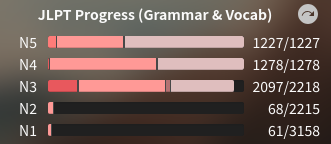
Thank you for doing that! Any way I can mark these all as correct for now? I’ve been pretty good recently at doing all my reviews every day and was at 0 reviewable before the reset happened :sweat_smile:

image

These first three bars had 0 cards that were in the lightest shade before. Not sure if there’s a way to bulk update (just noticed I’ve lost 10+ levels also) :disappointed_relieved:

2 Likes

The problem is that Bunpro has 99% coverage of WK Vocab, so this in theory would result in basically nothing getting reset.

Yep makes sense - I will say maybe an option to force the review type for cards that exist in both WK and Bunpro might be nice. That is if a card exists in both, it should be considered a Bunpro card, not a WK card, as I’m able to change the review types for Bunpro cards, but not for WK cards. One of the big reasons I disabled the WK functionality in the first place was because switching between Japanese → English (my preferred) and English → Japanese (forced for WK cards) became quite time consuming at ~500-800 reviews per day at the time.

This is closer to what we’re leaning towards.
We’re thinking of adding a second option in the dropdown, and then making their wordings these:
-Imported from Wanikani (JLPT & Non-JLPT)
-Imported from Wanikani (Non-JLPT Only)
Thoughts?

Yeah for sure better, although I think from a user standpoint it’s maybe still a bit unclear (if I do a community deck that has WK overlap, what happens then? if it’s a JLPT card but it’s from a level above what I’m studying in bunpro, what happens then? if it’s a JLPT card I’ve learnt in bunpro, but not yet in WK, what happens then? etc.)

I would think something more akin to:

  1. WaniKani (learnt first from WaniKani)
  2. WaniKani (learnt first from Bunpro)
  3. WaniKani (all)

Might be more clear.

Again, if I’m overstepping my bounds with the recommendations please let me know (I work in web-based software engineering but I don’t want to seem like a know-it-all about a platform that’s not mine haha)

1 Like

Actually, just thought about this a bit more, and I think both issues I mention in this comment could be solved at once:

  1. The ability to change (for a card that exists in both platforms) from a ‘WK-card’ to a ‘Bunpro-card’. This allows me to change the review type etc also if desired.

    1a. The ability to do this in batch for all items currently in my review queue that overlap (ie. specifically those already learnt in both platforms).

  2. Then, on the reset page, we could just have reset options for the card type, rather than specific business logic for the WaniKani platform integration. e.g. Reset all ‘WK-cards’ or Reset all cards already learnt in WaniKani (obviously with better wording but hopefully you get my idea)

@Jake @veritas_nz

Sorry to bother again (hopefully last time on this!). I noticed my reviews are back down to 0 so thank you very much for that. Is it possible to set:

  1. All of the remaining unlearnt cards in N3 (grammar and vocab) to learnt?
  2. After that, all of my cards currently at “Beginner” level to “Seasoned”?

That should bring me up pretty close to where I was at (maybe only a week or so out-of-date), the rest of which I should be able to fix manually in no more than a few hours.

Thank you both so much for your help, I really appreciate it :slight_smile:

image

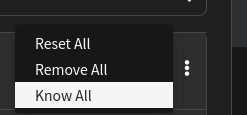
you can do that by yourself in the N3 deck

1 Like

Assuming that changes unknown to beginner? If so then yeah easy, I’ll do that! Thanks :slight_smile:

Definitely the smaller of the two issues though haha

image
if you want them to be beginner, you need to select learn all