Removing custom decks from review

Hi! Sorry I’m back again :sweat_smile: Is there any way to remove a custom deck from your reviews, or do I have to delete the deck entirely? 🥲 I made a custom deck and have other decks I want to focus on at the moment, but I can’t figure out how to remove the deck from my reviews. The custom deck itself is not set to “learning”.

Also, having the custom deck in my review is causing the review to bug out (it’ll recognize the correct answer, but it won’t get rid of the card and I’m making zero progress).

Is anyone else having this problem? Thanks in advance :bowing_woman:

EDIT: my custom deck has 22 cards in it (vocab only), and some of those cards aren’t showing up? I truly have no idea what’s going on :sob:

(post deleted by author)

Heya,

From my understanding of reviews it’s not a “deck thing” but an “overall cards thing”. Meaning that as long as you added certain words to reviews at some point, they’re not really that linked to the og deck anymore. The only thing you can’t do it remove that deck from your learning pile so that it stops sending you new words to learn. For the ones already there, you can go directly on their page and remove them manually. I don’t think there is a way to mass delete words, but I might be wrong

1 Like

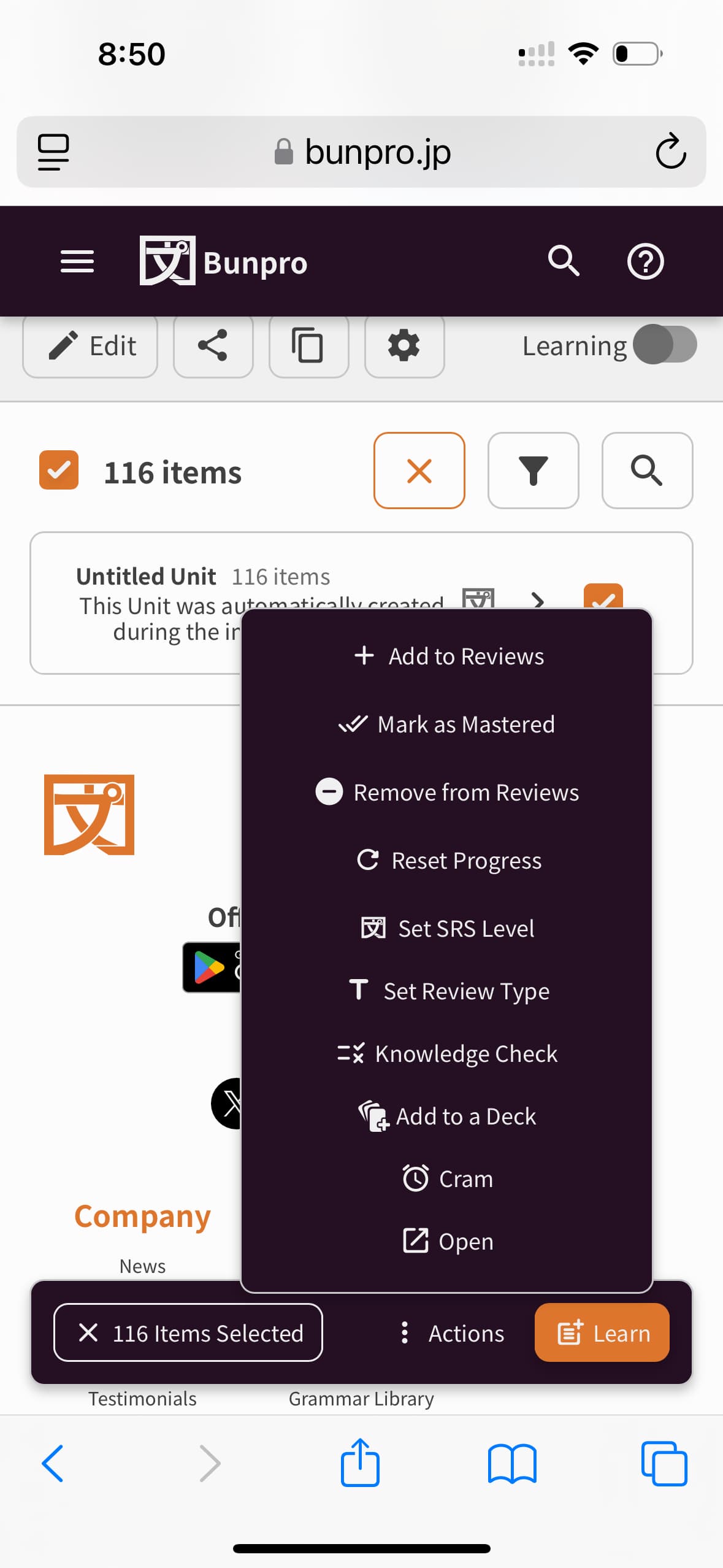
You can delete all the words in the custom deck all in one go. Click into the deck, then click the select icon (looks like a little check mark), then toggle the select all words checkmark (blank square, will toggle to a checkmark once clicked), then at the bottom of the screen, select Action > Remove from Reviews. This will reset all progress on these words though, so be careful if there are some words you’re wanting to keep your progress/SRS level on.

1 Like