Seeing wrong answers after inputting a wrong answer

Hi, I’m relatively new to Bunpro, still on the trial, but what really irritated me (and still does to some extent) is that when I enter a wrong answer, Bunpro helpfully shows me more wrong answers alongside my own wrong answer.

Apparently, what I should do is press “Show answer” to see the right answer…

Why? And why isn’t there even an option to automatically show the right answer?

1 Like

Can you clarify, what do you mean that it shows you additional wrong answers? I don’t think I’ve ever seen that.

There is an option to automatically show the right answer, though maybe not exactly what you’re looking for. You can go to the review settings and enable “Auto-expand info,” which will show you the lesson form of the correct answer underneath the review exercise as soon as you submit a response.

I don’t think there’s an option to automatically replace your incorrect answer with the correct answer. (Most likely they did this so that you can see what your mistake was!)

1 Like

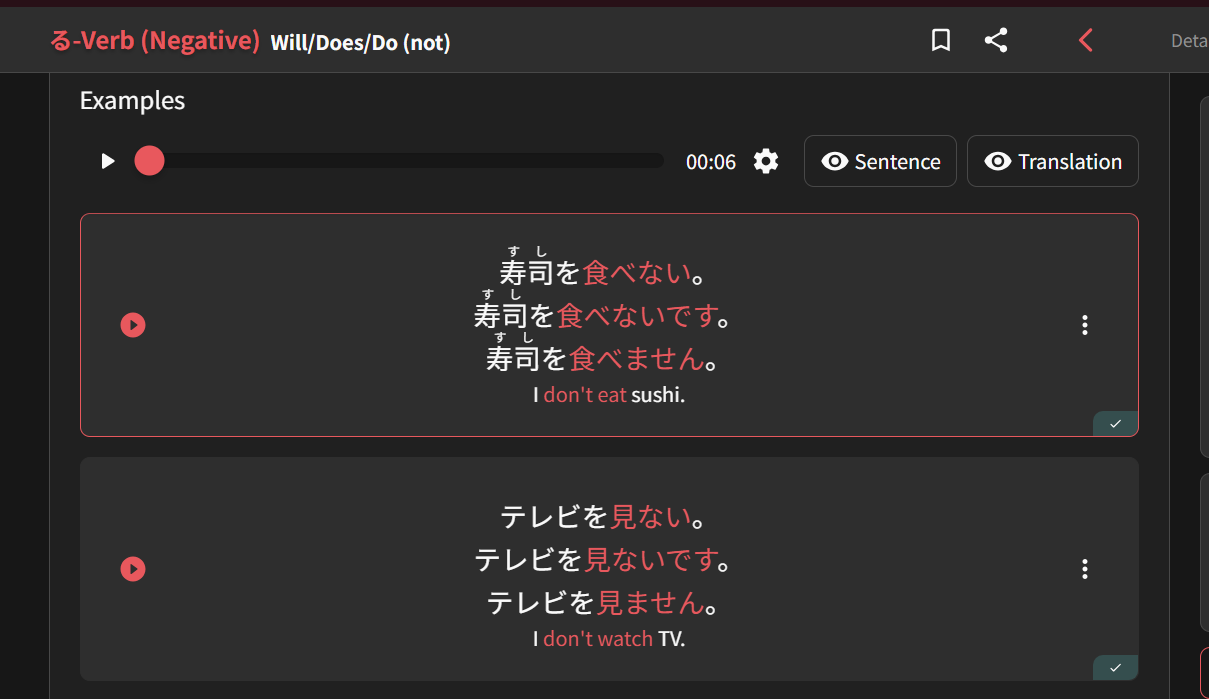
Yes, I mean when for example you are asked to enter a semi-polite answer, it’ll show you the standard form above and the polite form below. They are incorrect in the sense that they are not what you should enter in this context.

1 Like

Ohh I think I know what you’re talking about. Like this? Not wrong in the sense that all of these mean “I don’t eat sushi,” but rather wrong in the sense that the question specified a specific one of the 3 possible translations of that sentence.

I can’t answer why the Bunpro team wrote the conjugation lessons this way (I’m not sure who to tag - @JamesBunpro maybe?). Maybe some learners find it helpful to see where their answer should be situated on the casual to politeness spectrum? It should only affect the conjugation lessons though, I don’t think any other grammar points have 3 different options shown in the example itself.

The Bunpro review answers always appear the same way they are shown in the actual lesson. So when you study it from the lesson page and scroll to the examples, it will look exactly the same as above, with all 3 tiers in each item. I agree in this case it probably isn’t needed to see those when you submit the answer though, and might be more confusing than it is helpful.

1 Like

To be clear, I don’t mind seeing the different forms, but I do mind not seeing the correct answer at a first glance.

Even the “auto-expand info” is only for when you get it correct, not when you get it wrong, which feels like it’s been designed completely the wrong way around.

1 Like

I think the main goal is to show you that while they are incorrect for the context that they are looking for, they’re still correct and just wouldn’t fit in as well. I think that especially in the early stages of learning, it helps to reinforce the different levels of formality that are inherit in Japanese speech, and that sometimes you can mix up the formality, for better or for worse.

I personally grew to like this, as it helped me to better understand the nuances as I was learning things more.

I’ll also add, that over time, these types of answers start coming up less frequently, and they’re more direct about the politeness level they’re looking for and whether you got it right.

As for auto-expand info only showing up when you get an answer correct, I think there is some intention behind that. I’m still working on N5, so I’m not exactly deep into this journey, but in my very early stages, I would immediately show the answer if I didn’t feel like I was totally confident in my guess. What I’ve found over time is that it’s more helpful if I try to guess a couple of times before giving up and looking up the answer, and I think that’s the intention behind this behavior. I believe that the goal is to get you to try to recall the answer on your own an donly then should you look it up. In the early stages, you’ll be looking them up frequently, but as you go, you’ll get more confident with guessing, and more OK with guessing wrong and having the item come up more often.

Just this morning I was doing a vocab review and I knew that I knew the item and had guessed it wrong a couple of times, but couldn’t recall right away. So I got up and thought about it while I did a couple of chores, and after a minute or so of thinking through similar-looking items, I remembered, and it was a great feeling! I think that kind of thing is what they’re after with that behavior.

2 Likes

@KiyoKatu Is basically exactly correct here. I’ll just provide a bit more behind the scenes context though.

This type of question used to have all the forms displayed both before and after the question, with the target of the question as a blank. We consistently received negative feedback on this so decided to remove the non-target forms from the question (‘front of the card’) but keep it when showing the answer. It is there as a reminder that other legitimate forms exist, but we just happened to be asking for a specific form in that instance.

This style is only used for a very small handful of conjugation focused reviews/grammar points. As they all come earlier on (the first half of N5), many people are not used to using the tense hints fully yet, so the extra reminder that other forms exist also helps remind people that we are looking for specific politeness levels during reviews (something quite important to most reviews later on).

It is a challenge to balance this question type so that all users like it, although the current form has been the most popular by far.

No reviews show the correct answer automatically after a wrong answer barring very close typos/input errors. This is by design, so that you can fail the review and have a chance to redo it then and there or as part of the wrapup of the review session. You can of course reveal the answer manually to see immediately what was wrong, but we want people to have the oppurtunity to see they are wrong and try to remember the correct answer on their own first. Self-correction and active recall are extremely powerful for learning, so this is intended.

If you really do not like this style of review then you may want to check out the various review types and settings available. For example, the self-graded reading style reviews will immediately show you the answer, as they act like traditional “sentence cards”. We have a lot of options so hopefully there is something that clicks with you there!

3 Likes

Nah, I do like having to enter it, but something about Bunpro’s UI just seems really unintuitive/irritating to me. Maybe it’s the overuse of red?

THIS is actually my problem with this style of answer: The color. Maybe the alternative answers could be in an other color than red? Or in a smaller font size? Just somehow so that the desired answer stands out from the alternatives :thinking:

1 Like