
Using Bunpro UI to restart after a long absence

Hello! I used to review on Bunpro regularly, but I’m returning now after a long time. I have 233 reviews.

I thought a good way to tackle it would be to remove all of the Beginner and Adept from my reviews, then grind through the Seasoned and Expert ones quickly and start re-adding grammar points.

When I click ↑ these buttons, I get a list, but there’s no way to bulk select and remove them from my reviews. I would have to open each one at a time, hit the gear icon, and choose ‘remove from reviews’.

Is there something I’m missing?
3 Likes

Another question. I decided to set the queue order to Expert items first to begin working down my pile.

The idea of an SRS is to remind you of an item just before you forget it. So the items I got wrong are likely scheduled for tomorrow or in the coming days.

I’d like to get these reviews as they come up, but I’m afraid that they just fell into my huge pile of reviews and they may or may not come up for me on a given day.

In Anki I would use a filter, or move my catch-up pile to a temporary deck so that I could keep up with the fresh reviews coming in.

I saw an option for sorting for the most overdue coming first.

Is there an option for freshest reviews to come first?

Thank you!

2 Likes

When I click ↑ these buttons, I get a list, but there’s no way to bulk select and remove them from my reviews. I would have to open each one at a time, hit the gear icon, and choose ‘remove from reviews’.

You’re not missing anything – from that menu you’re not able to perform mass-actions.
Although that would be pretty nice if you could.

I saw an option for sorting for the most overdue coming first.

Currently not.
But that’s a pretty easy win for a new option.
I’ve added it in now

3 Likes

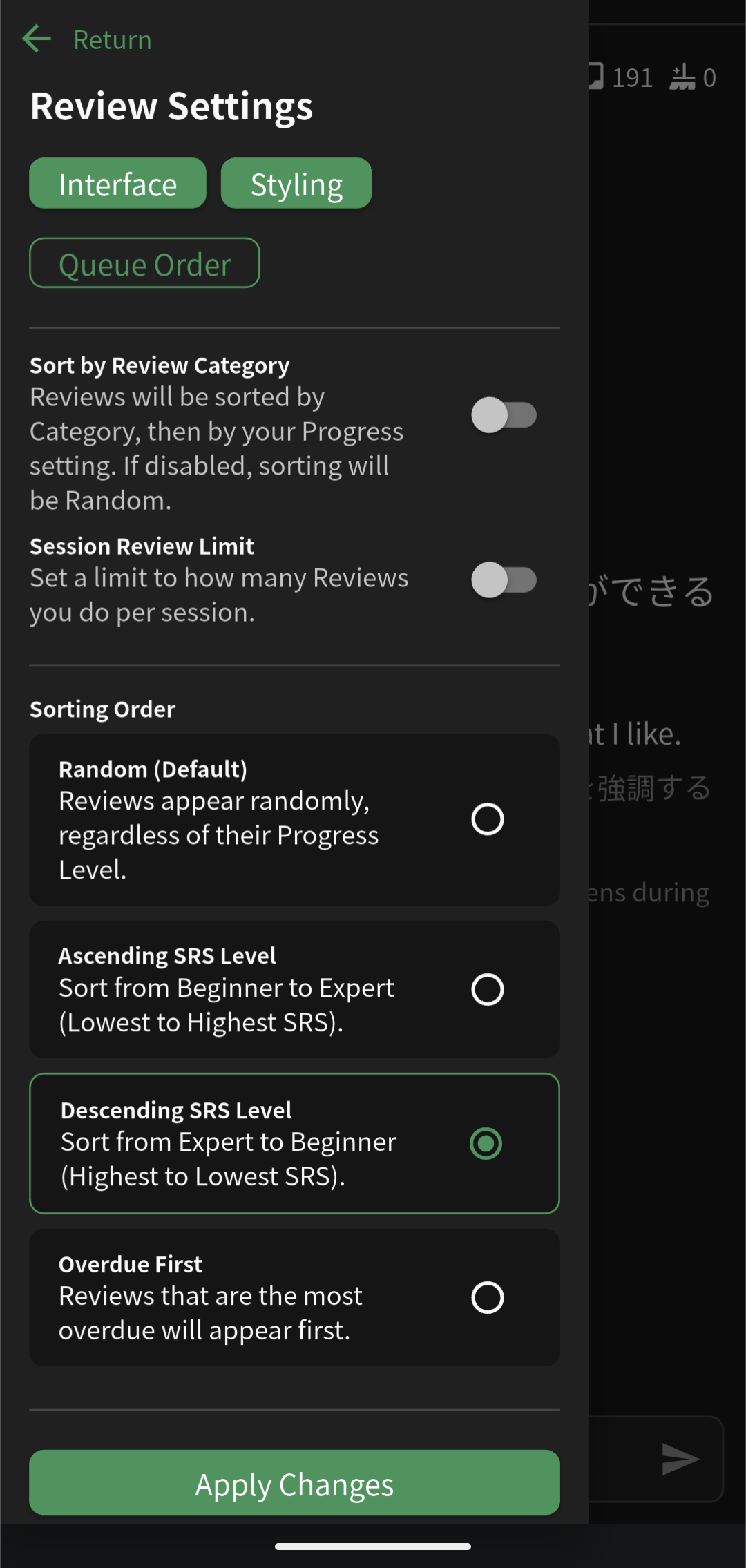
That’s amazing! Do you mean that you added an option to do the fresh reviews first? I’m on the app right now, and these are the options.

1 Like

App support is coming!
It will probably have to wait for the next app update, which I believe will be in a week or two 🙇‍♂️

3 Likes

Thank you! I’ll just practice on my computer until the app update gets pushed out. I’m very happy you published that feature so quickly, it’s helping me feel like I’m doing a thorough job catching up!

As for this feature, I assume it would take more time to implement. I think in my case I might have to do it the slow way once I work through these higher SRS items.

Do you think this would be worthy to be added to the pile of other great ideas I’m sure y’all have in your pipeline?

1 Like

I think it’s a pretty powerful feature and people would probably use it.
I’ll wait a little longer before committing to it though.
It will likely require custom designs for it

3 Likes