
Could we have a feature where you can bookmark example sentences you like?
I have a routine of writing down example sentences I like on paper and read them out aloud everyday. These are usually sentences I made a mistake with or those that contains constructs I found useful. I found out that this helps with verbal output a lot.
The added benefit of having it directly on Bunpro would be that I can just listen to a continuous stream of audio, which helps with listening. Would be very useful to do on commute, when I don’t want to hold up my phone and type in words.
Some feature ideas:
- Add a “Add bookmark” button (a star icon?) to every example sentence both under:
- the vocab/grammar points, and
- the SRS interface, when you review the sentence.
- Add a “My Bookmarked Sentences” page where you can see all your bookmarked sentences.
- BONUS: You can play the audios of the sentences as if they are songs in a spotify playlist. You should be able to shuffle them or play them in the reverse chronological order.
- On the mobile app, this should keep playing even if you lock your phone or switch to a different app.
- BONUS: You can play the audios of the sentences as if they are songs in a spotify playlist. You should be able to shuffle them or play them in the reverse chronological order.
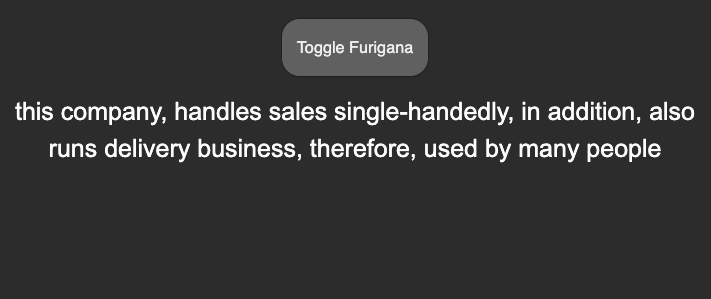
- Add a SRS mode called “Translation Exercise” where you are prompted with the sentence’s English translation, and tries to say the corresponding Japanese sentence. This is also something I routinely do (see the screenshot below) and find it useful as an output practice.
About shuffling audio: we can bias the shuffling algorithm so it prioritizes recently added sentences (kind of like how SRS works).
About translation exercise: It would look something like this.
Front:
Back:
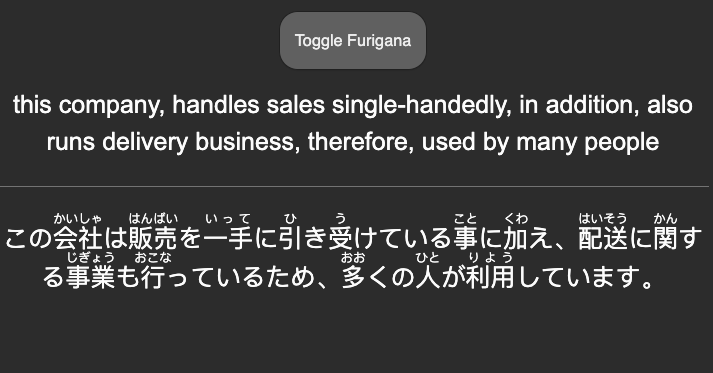
There is no hard accept/reject standard, the user decides if they said the sentence reasonably well or missed a huge part of it.
 )
)