:bunpro_icon: Feedback - Suggested Improvements/Feature Request

Would love to have a mode testing particle use only !

For example, when learning a verb like 気付く (to notice), one could think that the correct object particle to use is を, even though it’s actually に. Bunpro excludes the particle from the cloze answer, which is a shame for retention of natural japanese i think.

Also, for grammar points where particles are super important like くれる/もらう/あげる or 使役/受身/使役受身, particle testing could be a great supplementary exercise.

2 Likes

Maybe a good suggestion would be to have a way to understand the difference between some very close words in vocabulary. For instance, for “teacher”, there is “sensei” and “kyoushi”. But why are there two different words for the (apparently) similar concept? Currently, I would need to search on other websites. But having a short summary on different contexts for similar words would be great.

Thank you!

7 Likes

@ojojo

Agreed! The ones you mentioned can be a pain. Funnily enough one I can’t seem to figure out and always get wrong is に vs で with 途中 … drives me nuts :sob:

Random question, which I don’t know where to ask:

What kind of cram counts towards the cram badge? Is it only if I launch a separate cram session? Or does the counter move if I do the cram missed items as well? I do not cram using the specific feature, only cram the missed items after sessions. Do those count?

Thank you for any info on this.

Could we have a random grammar point link, like how every wiki has a link that’ll just bring up a random page on that wiki?

One thing I’ve been doing studying Korean: I’ll use a random number generator to find a random past grammar point and make up sentences using that grammar point. If I had something like that built into Bunpro, that’d do wonders for keeping me fresh on old material. I know the cram function is akin to that, but I like to just take one grammar point and hit it hard.

Small personal feedback, but I think many people would agree.

I really would like to see a button to hide vocabulary reviews. I want to use wanikani api to track which words I already know so I can hide the furigana on here, but seeing 1400+ reviews on my homepage is not very helpful. It is cumbersome and confusing.
A simple toggle vocabulary review on/off in the settings to hide them from view so I can focus on grammar effectively would be amazing.

This wouldn’t affect users using both currently , but would benefit people who started using bunpro before the vocabulary review addition!

1 Like

@iro-iro

Yep, agree…I sort of hate seeing the huge number staring at me. Makes me not want to study.

On another note, anyone got a good way to export Bunpro grammar SRS data to a file? I know there’s a “share profile” function but it’s not useful for exporting to a txt or md file etc.
What I’m doing right now is mass copying the Grammar Points page in full with copy(document.body.innerText) and cleaning that up…but it’s tedious.

For vocab there’s that handy tampermonkey script that works pretty well, but it doesn’t seem to work for grammar. API would be amazing but for now any better methods? If not, can we please have some export options?

1 Like

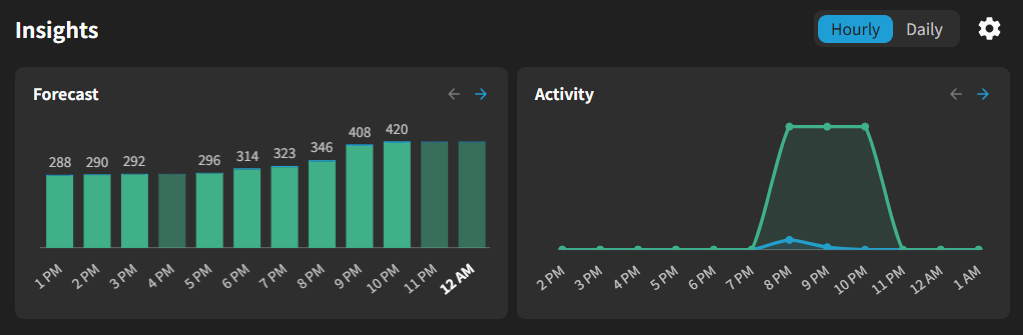
I like the “Insights” into activity and future reviews - much more compact!
The only thing I’m not so happy with is having to choose Hourly/Daily for both, as I’d much prefer to see an hourly forecast but previous activity shown by day.
A minor thing too, but it makes sense for me to show previous activity to the left of a future forecast on the right.
Nice change overall :slight_smile:

2 Likes

You beat me by 5 minutes on this! I just posted a thread on this change, making almost the exact same points haha. You hadn’t posted the reply, but while I was working on wording and formatting, you beat me to the punch!

https://community.bunpro.jp/t/the-new-insights-section-on-the-dashboard/202782/2

1 Like

If more than 1 of us is thinking the same thing, then we might get more credibility than just a random bunny and a katu! :rabbit: :cat:

1 Like

I have a suggestion for the forum for consideration.

I see the same topics pop-up frequently, like recommendation for N5 level learning, immersion, N3 JLPT preparation, etc. Maybe specific forum threads could be opened, so things are kept in the same place: learning and material/ immersion recommendations for each level and also JLPT preparation thread for each level.

It would help a lot to have relevant things for a certain level in the same place. Now I use the search, but things are all over the forums. Some time I find something good and the next time, I cannot find it.

2 Likes

When viewing an entire deck, is there no way to filter it and only show items that you haven’t studied yet? This feels like an obvious idea for a feature, but I’ve never been able to find it. I only see the option to change settings.

I’m using the Bunpro decks, but I currently prefer adding individual items to my reviews manually rather than using the available sort orders. But I have to scroll through the entire thing and find which items I haven’t done yet.

4 Likes

Is there a way to remove/hide the Activity graph on the Insights panel? I never use it (I only look at the Forecast graph), so now the Insights panel looks smushed and it’s rather frustrating.

1 Like

Took a break for a while and came back to a bunch of pending reviews. Some things that might be nice to have would be:

Some way to “soft reset” reviews kinda like Vacation Mode but manually triggered. Not sure exactly how this would work/be formed, but might be something along the lines of “adjust SRS queuing to x# of items batched across day boundaries.” e.g. I want to only have 100 items in my queue today, but I have 2000, so it would be 20 days of those 2000 items broken down into batches of 100, with all pending SRS scheduling pushed off/delayed by 20 days (no new items unless the user adds new items to queue/reviews via lessons or other means). Maybe softer/harsher SRS queueing penalties for these items to figure out what was really forgotten vs what needs a “refresh” as well (repeat failure means really forgotten harsh penalty, one failure means no penalty, remain in same SRS bucket/level).

Better discoverability for Unclassified and A-Level items. After running imports from Wani-Kani I have discovered that the integration isn’t great. Lots of items only support flashcard/definition mode because they are A-Level items or just unclassified. I’ve tried using the existing frontend API’s to create a custom deck of these items so I can more easily remove them from my reviews/queue, but it would be nice for there to be decks for all “reviewables” on Bunpro.

On a similar note, it might be useful to have a grid-page of all items that the user has in their “reviews”, and a more easily batchable way to manage/remove items from reviews via this view.

It would also be nice to “pause” something from the Reviews but not forget the SRS level entirely. e.g. I want to stop reviewing “Vocab” items, but I don’t want to completely nuke my SRS levels which removing them from my review queue seems to do.

1 Like

I would like to suggest the following hint change:

when the grammar is correct, but you put it in the standard form instead of the polite form, instead of the hint “how about a grammar pattern that is a bit more polite”, I think something like “This, but politely!” or something would be better. As it stands, the current hint sometimes makes me try for different grammar patterns entirely when I’ve actually already got the correct pattern.

14 Likes

I feel like the first few review sentences for a new grammar point should be close to the actual lesson, before hitting you with different variants.

For example, just added いたす - N4 lesson 7

It’s taught as する → いたす
お + verb stem + いたす
ご + verb stem + いたす

Thought that made sense and didn’t seem too hard. But the first sentence I’ve had asks for しても. Can’t see an お, a ご or anything else related to the actual lesson? Maybe I’m just dumb but I don’t get how this relates to いたす as it’s taught at all. Anyone else get confused by this when they learned it?

The sentence: 拝借してもよろしいですか。

Edit: I see now, it’s a trap review testing the “caution” section. Not a big fan of this, can barely remember the grammar itself let alone the rules for it. Still would have preferred a sentence that uses いたします, like it’s taught in every other lesson sentence.

3 Likes

I like the keyboard hotkeys so much when doing reviews on PC to jump directly to dedicated sections of an item. However, I’ve noticed that the Hotkey Guide is outdated, and for example, it doesn’t list R as the key used to jump into Resources.

Also, I think there’s no hotkey for jumping into the newer Related section, which is the one I see myself visiting the most to review the nuances of a grammar point compared to related ones. It’d be nice if this was added!

2 Likes

Show pitch of vocab on the „backside“ of the card

Not only on the info tab

At least i couldnt find a setting to do so

This is pretty niche but havig a spell check for community posts so I can hide that I can’t spell!

2 Likes

Hmm, community is basically Discourse, and it relies on your browser settings for that. You might want to look into that, I have spell checking when writing here!