i think i’ve found a way.
it takes a lil time and effort to set up, but it’s almost hands-free after that (altho it gets a little freaky at one point  ). but in the end this method should ensure that the reviews are both spaced out, and at the correct srs stage from the get-go. so you don’t have to painstakingly set the srs stages for items manually over a period of weeks or months. you can set it all up in one day, and sit back and relax after that (ish
  )
)
honestly tho, if this helps at least one person- please let me know and i’ll cry tears of joy. it has been a nightmare trying to figure this out 
anyway, buckle up! the anki migration guide:
think about this before actually going thru with anything
…but it might not make much sense until after reading the rest of the guide so bear with me:
first you have to choose how many words will be in one ‘unit’ (for the sake of a smooth setup)
- how many words do you learn per day usually? i’d go for that number. for example, if you learn 25 NEW words per day usually, then that’s my recommendation for the number of words in a unit. personally i would not go over 50.
- for example, if you choose 25 items per unit, then with this guide it ends up being 1k cards integrated into your bunpro queue in a week. done and done. 50 items per unit and you’re done migrating 2k cards in a week. mastered cards are separate from this count.
^this does NOT mean that you will have a lot of work to do every day for a week. see:
- all of the setup is done on the First Day already, but actually adding the cards to the review queue will be slightly gradual so as to not create insane review counts for later. that’s what this number is for. it is going to imitate and reflect your ‘natural’ flow that you’ve had before migrating, and we can’t work around this without an official tool from bunpro
- in the end, all the items will have their reviews spaced out scarily evenly for the next few months as they would be in anki- so they won’t show up again all at once ever (there’s only going to be one bigger batch of reviews when first adding them BUT you won’t have to actually do it properly either, i’ll explain. after that initial fake review, they’ll have their correct srs that corresponds to their original anki due date)
- the overall workload later on will look ‘as though’ you were on bunpro all this time and were adding an X number of items per day for months already. if this makes sense. i hope it does
- this method is time-intensive on the first day ONLY, but it still need a lil finagling for a week or so after that.
info for later: if your chosen number is 25, then
- if you have units (see in a sec), each unit needs 25 items in it
- if you don’t have units, then your ‘daily goal size’ and ‘batch size’ in deck settings need to be set to 25 items. personally i don’t rec this tho
part 1: anki export and file cleanup
step 1:
browse your deck. sort the cards by due date, move to separate decks, and export it all in batches that depend on the due date of the cards
for example: in your case, you can do seven batches like so (but again, you can split it into whatever ranges fit you best)
- card that have their due date in less than 1 week
- 1 week ish
- 1-2 weeks
- 2-4 weeks
- 1-2 months
- 2-3 months
- done cards, don’t wanna see again
step 2:
prep the file for import in bunpro. a cleaned-up file ready for import should look like this:
# unit
単語
単語
単語
# unit
単語
単語
単語
- ‘#’ indicates a new unit. important because: the number of words under each unit is the number i talked about in the previous section. it will be the number of items you will be adding daily to reviews for EACH srs stage! (application of that is gna be explained more thoroughly in later sections)
- if it’s too much hassle, you can skip creating units altogether! but later it only leaves you with one way to add the items to reviews that’s imo more annoying
- in any case, no need to create units for the cards that you’re done with in anki (unless you don’t want to mark them as mastered in bunpro)
part 2: bunpro import
step 1:
create seven custom decks (one for each ‘due date range’ batch).
it’d be best to temporarily name the decks by those ranges (‘less than 1w’, ‘1w’, ‘2w’, etc)
step 2:
import the anki batches to their corresponding decks.
here you also have to check and delete missing items. not everything is in the bunpro database
if you have units: check that the items are correctly split into units and are not just one big list of words for some reason
part 3: decks setup
add all the decks to your ‘learn queue’
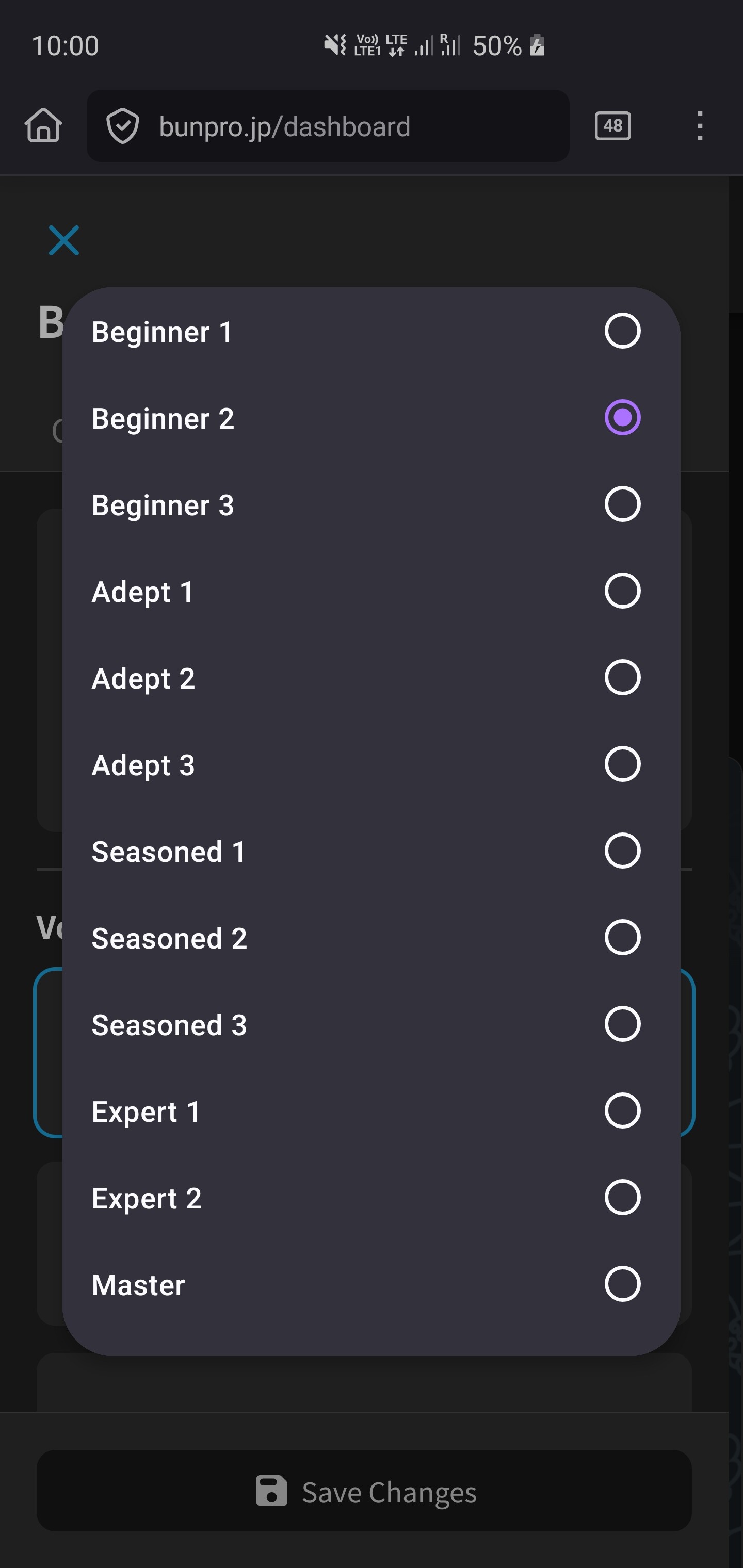
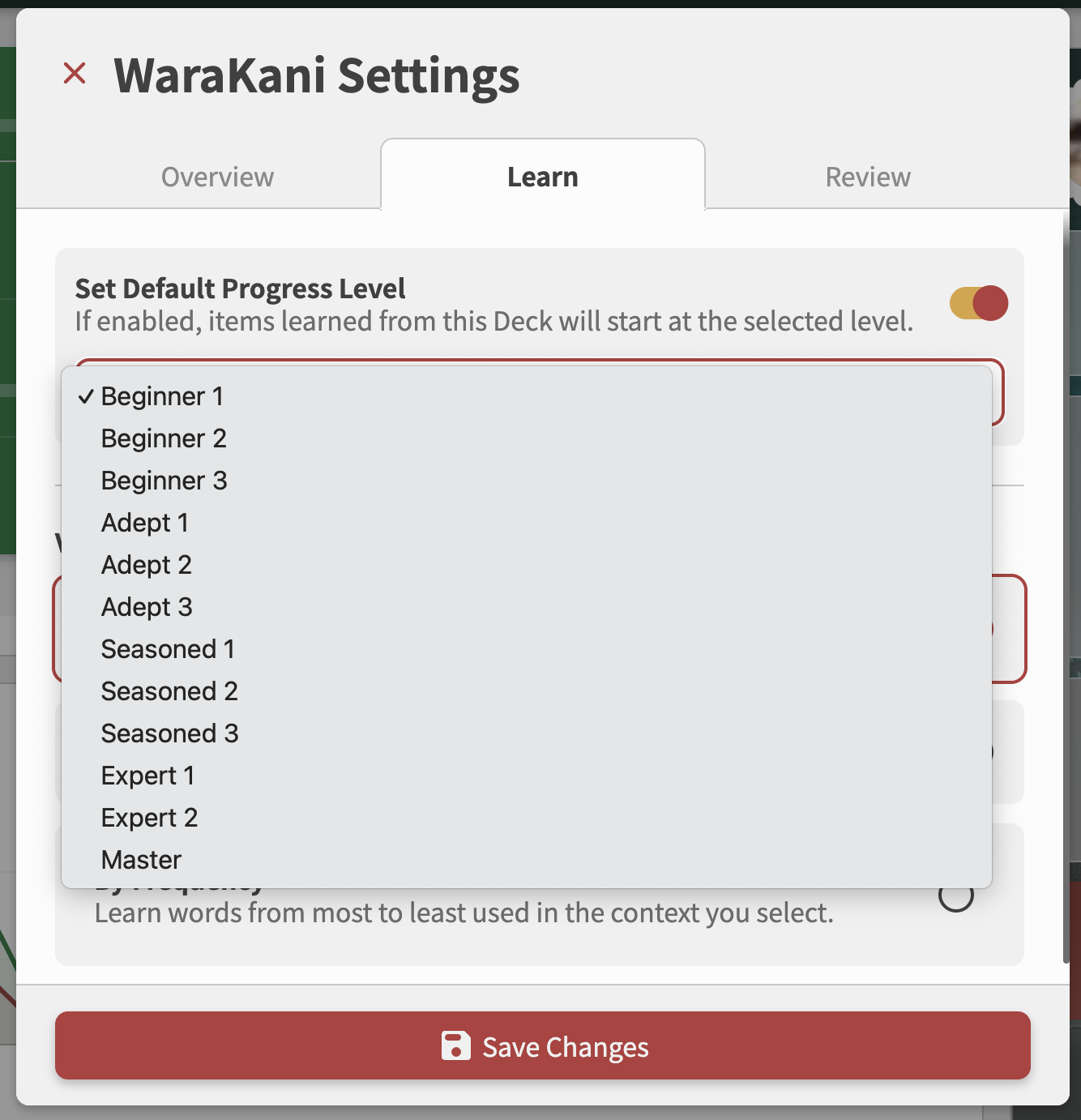
in each of the deck settings on the dashboard (dropdown menu), choose the ‘learn’ tab, and toggle ‘set default progress level’.
the srs value is gna be different depending on the deck:
- less than 1 week - any srs between beginner 2 and adept 1 (i rec beginner 3- after you’re done with the guide, it’s actually gna turn into adept 1 and your actual proper next review is gna be in 2 days)
- 1 week - adept 2
- 1-2 weeks - adept 3
- 2-4 weeks - seasoned 1
- 1-2 months - seasoned 2
- 2-3 months - seasoned 3 (next review in 4 months) or seasoned 2 (next review in 2 months - doubles with prev batch!)
- done cards - mark all items as mastered (find a dropdown menu in the deck page) and delete the deck
note: these srs stages are currently on purpose one stage below what they will actually be after you’re done with this guide, so if the numbers don’t make sense at first glance, it’s bc of that
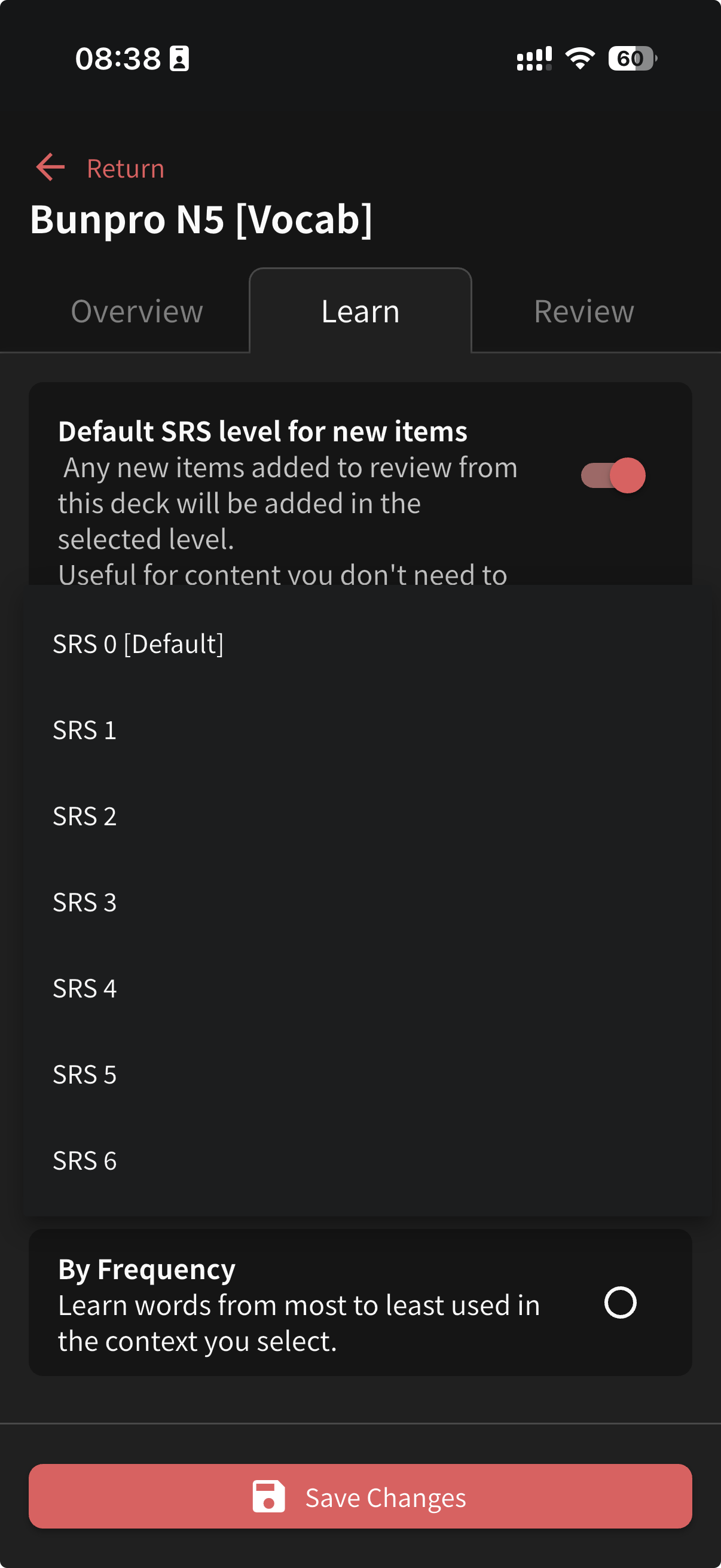
note: the ‘default srs lvl’ in the actual deck page settings only goes up to srs 6 and not srs 12, so you have to access the deck settings from the dashboard. this gave me a headache
the heavy-duty setup is done!
part 4: adding the items to reviews
two ways to do this, and both hurt just a little.
this part will be iterated over and over for a few days or a week or more, depending on how many items you got, but imo it still beats going for the alternatives (aka lotsa reviews at once for way too long, or dealing with manual srs setup for each encountered item)
note: you need a ‘reveal & grade’ type of question to make this work. the option is in the deck settings. (fyi, you can change the type to whatever works for you after finishing the migration process after a few days).
if your deck has units:
- super important! make sure you have ZERO regular reviews due when doing this!! don’t start this at the end of the hour either
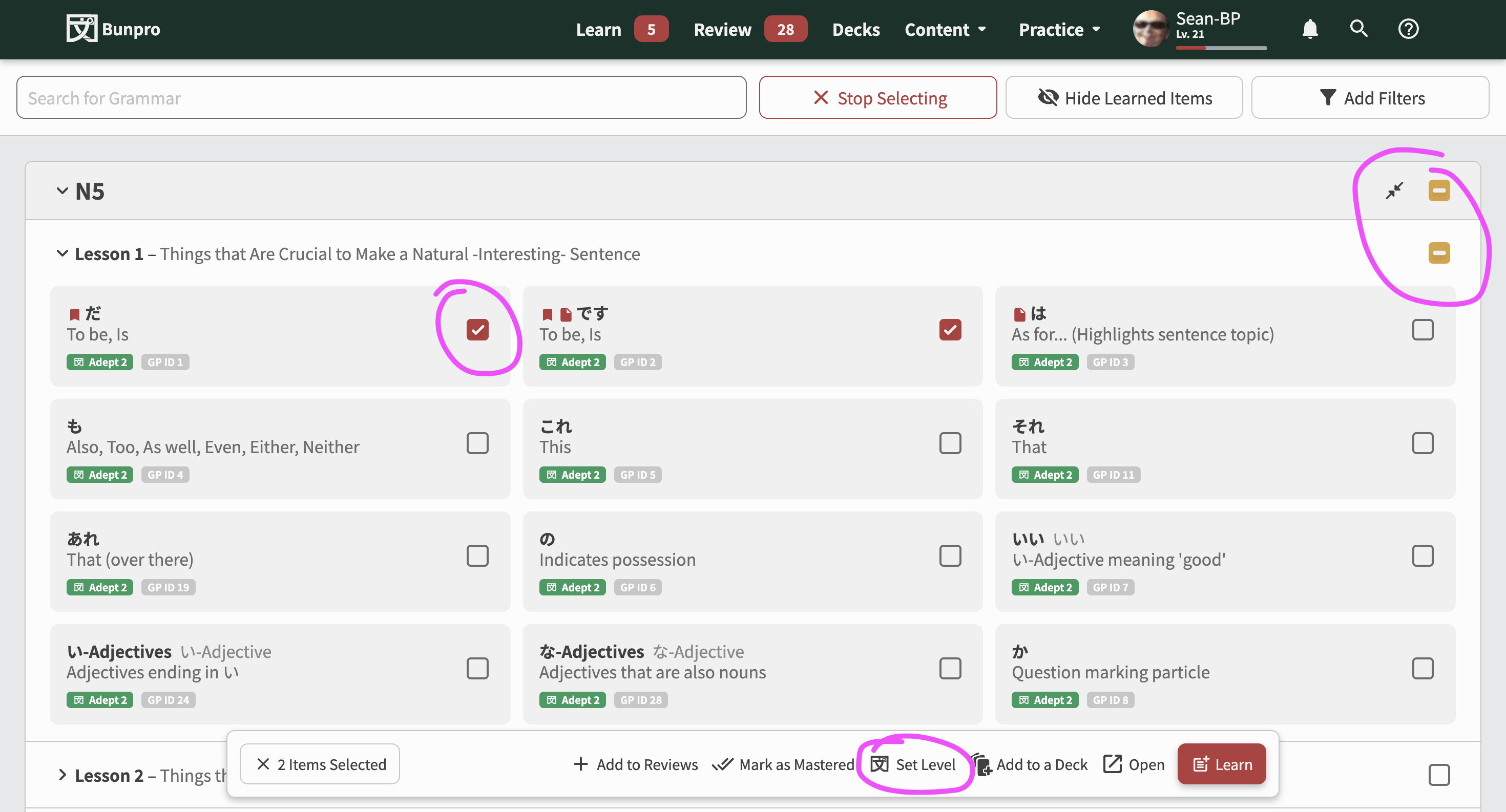
- go to the deck page, click the dropdown menu for a unit, and choose ‘add all’. this will add X number of items to your review queue NOW. but don’t fret yet.
- repeat for each deck (six times total in this example in this guide).
- you now have lots of reviews due. don’t worry and go to ‘review’, and just smash the correct answer button for ALL the items that show up. it’s gonna feel absolutely barbaric and wrong- but trust me, your srs right now is one stage below what it should be, and this is the fastest way to get the items into your proper review queue with the correct srs timing and with no brain power required. you can watch a funny video for that minute or two when you’re just spamming the reviews
alternatively, you can do the no-unit version below, but it’s way more clicking inbetween, since you have to spam thru the lessons as well. you also can’t spam through all the reviews from all the decks at once. you have to do each deck separately but it still works n gives the same results
if your deck doesn’t have units:
- then you go to ‘learn’ on your dashboard, fast forward to the quiz, and spam the correct answers. now those items are at their correct srs stage and will not show up until their time is due. same as in anki.
- repeat separately for each deck
you’re done- for the day. now you gta do it the next day for the next unit for each deck (or the next ‘learn’ batch if you’re not using units). but believe me this goes by fast, and you’re done in a few days/week (or whatever pace you choose).
congrats, you’ve migrated your anki deck and it’s all spaced out over the next 4 months~
please let me know if i’ve fumbled anything anywhere here  this is my legacy fr
on that note, what if there was a tool to let a user upload an anki export (that has a column with the due date info in it) and bunpro analyzes the contents and adds the items to reviews- but over a set period of time? like with master+ items. something that gives similar results to what i’ve outlined in the guide above (essentially the same thing) but it’d be a LOT less user-dependent
lemme explain some more
- user exports their anki deck with the due date info in it
- imports that to bunpro ofc
- the user could go through the imported list first, to see which items are missing in the bunpro database etc. now the user’s job is almost done (one lil thing remaining in a sec)
- THEN some automated magic happens: what if that tool could categorize all those items based on their anki due date range? for example: anki due date in 70 days? The tool sets it to the srs stage that makes it have the next review in 2 months. (prob better to round down a wee bit due to what i propose later)
- now those items have a ‘starting srs lvl’ assigned to them (a level that’s closest to their original due date) BUT they’re not added to the reviews just yet
- now one last job for the user: they choose the speed at which the import should be added to the reviews, for example, 20-50 items of each srs stage daily (which multiplies fast and so the import is done in days BUT it doesn’t clog up the reviews all at once)
- bunpro iterates over that original import at a set time each day, and only adds that predetermined limited number of items into reviews until the import list is exhausted. It makes for a very smooth reviewing experience down the road. it’d work sort of like the master+ mode where it’s capped at 20 new reviews per day
and so, this essentially takes the human element out of my previous barebones solution where the user had to split up the export themselves, make a few decks, import stuff separately (only 7 batches in that example above but still), assign starting srs, and then go into each ‘due date’ deck every day for a few days, and add one unit to the reviews per deck per day, and on top of that speed run through fake review sessions. doable that way anyway, but there’s room for automation.
(btw about that original import that would be iterated over: it could be saved in bunpro as an ‘automated deck’ in the decks tab, or something maybe…? so as to not be left in the void)
please hit me with any questions, i’d love to spill all my ideas (and thank you for reading! i hope that even if my solutions are not feasible, that they could at least be used to come up with something better  i know a few folks that gave up on bunpro because they haven’t started learning with it and can’t be bothered to set it up themselves (since it’s thousands of items) so figuring something out in this regard could help a few people at least!)
ALSO, a bug? i’ve just noticed a discrepancy in deck settings (on an android browser):
- on the dashboard, all is good
- on the actual deck page in the deck settings, the ‘default srs level’ is maxed out at srs 6 for new items for some reason (which is where i’ve been always setting it and didn’t know it could be higher, so now i’m hysterical over discovering the options on the dashboard tday )
screenshots

 I think because a lot of ます形 and フリガナ. Would be nice to have 皆の日本語 Community or official vocab decks. JPDB doesn’t have them either, so can’t mark those as known and xfer over. And I couldn’t get their import to work with my decks either.
 thank you for your interest~