
Fantastic! You guys rule!
1 Like
Regarding the error highlighting, is this a bug or intended behaviour? The part I entered that was correct showed as red (incorrect?). It feels like it’s backwards and the part that was missing/wrong should be red.
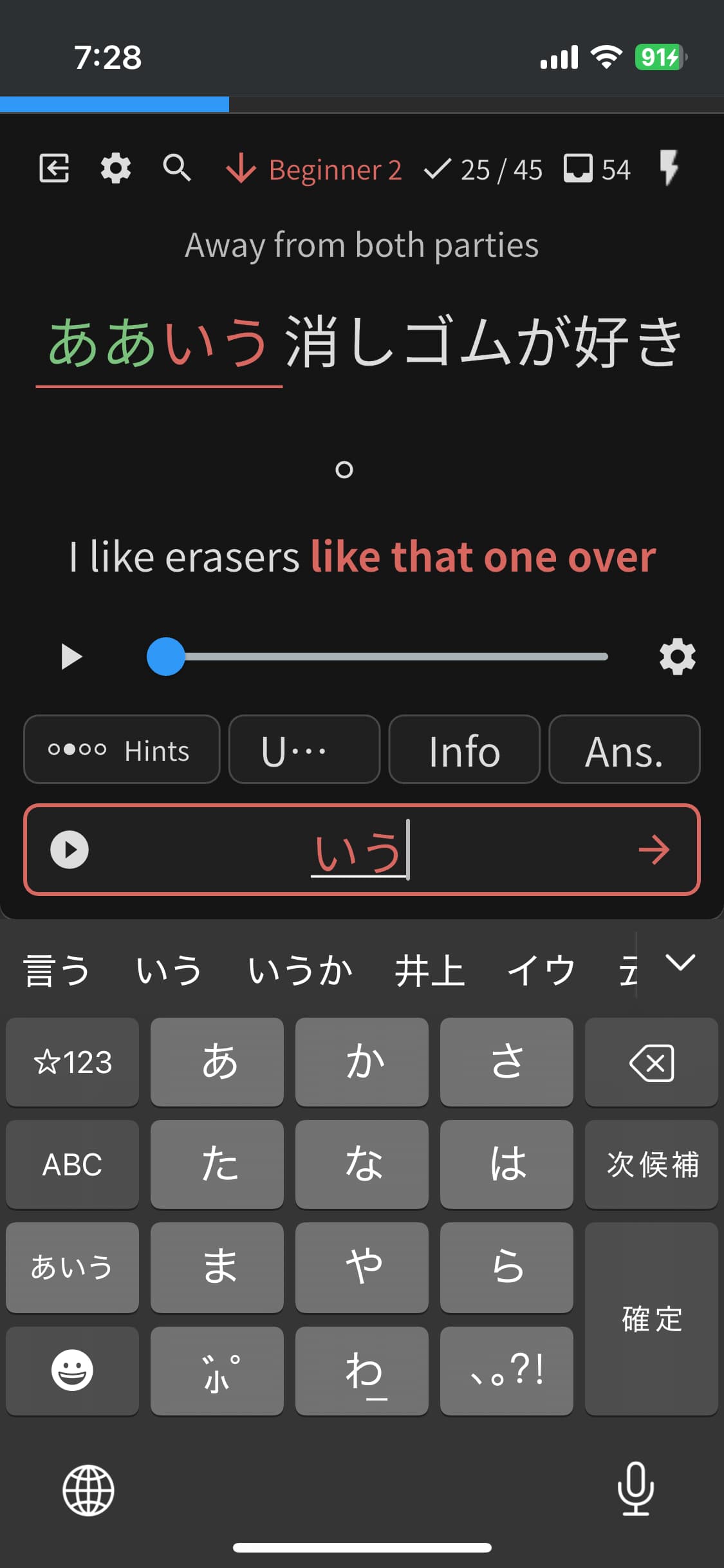
2 Likes
I’m having the exact same issue.
I notice it’s only on iOS, and not on the webapp on a browser.
It also doesn’t always highlight the word now.
1 Like
@Heatmanofurioso
@Alerean
I’ve fixed this bug, the patch is waiting for the release!
Sorry for the inconvenience 
2 Likes
Hi just wondering if there will be an update coming soon for showing the number of reviews in the Bunpro App icon? This would be very useful!
2 Likes
We have just released mobile app update:
- added full JLPT tests support with offline functionality
- you can start/continue/finish your test offline, they will sync with the website
- You can download the assets using the ‘download’ icon or button, so you can do the listening
- you can change questions using drag gesture
- you can zoom using pinch gesture
- you can also tap on images to increase their size
section fully offline
- added Indonesian translations
- fixed bugs
- fixed bug in JLPT tests where furigana was not displayed correctly with questions with context. Waiting for release.
8 Likes
Update??? The app icon does not sync properly in the background.
2 Likes
It’s been happening since iOS 26 I believe. Hope they fix it soon
1 Like
Are there thoughts of adding a homescreen widget? I would love to be able to show maybe the number or reviews per day or even streak so I would be more motivated to get on every day and do my reviews! The app is great though - the hard work you all put in is evident!
4 Likes
There’s also a bug in the app where the custom decks does not show even after reopening/close the app after doing a full resync from the options menu and also says nothing on the learn queue with that missing custom deck even though the website has new grammar items from it.
1 Like
Or even a random word in our vocab would be cool. I’ve always thought about ways in which I can expose myself to the things I’m learning, like a ticker across my monitor or app widgets.
2 Likes
Still not working. I recall test flight app worked for this
1 Like
FWIW this is probably broken as well but I can no longer verify this since my sync would not reveal this data.
1 Like
[PM]ed.
Does it also happen when you finish reviews completely, close the app.
The number does not change?
Usually updates at that point. Some exception but not noteworthy as of recent experience
1 Like
Hello, is it possible to turn off the animation for the info tab or get it back to how it used to be? Having to scroll back after viewing it takes a lot longer than the easy gesture that was previously available.
Additionally, the back button on the info page just takes you back home now instead of to the reviews, so it makes it confusing to use.
I tried reverting back to an older TestFlight version but seems like that wouldn’t boot past the splash screen, so hope there’s an easy change somewhere in the settings I’m missing. Thank you all though for the constant updates!
5 Likes
Hey!
The new version will have it improved
The fast way to scroll up is to just ‘catch’ the top part of the screen and then scroll back.
Also, tapping on the text input field should scroll up to the top.
Cheers!
Ya what was the point of that change? It made the info section confusing to use - looks terrible. Would be curious to know how that gets prioritized over basic functionality currently missing