
Is it not possible to create/edit decks in the IOS app?
At least i couldnt find this option anywhere
1 Like
Not yet.
We’re not sure if we’re gonna be adding support for this in the app or not yet.
I believe adding items to existing Decks is available already or coming very soon
EDIT: @cafelatte @janjan2
“Add Item to Deck” buttons coming to Android later today.
As for the App Store , we’re waiting on a check from Apple before we can publish this latest version to the App Store
4 Likes
I look forward to this!
1 Like
This awnser was too fast thank you very much!
For me at least that would be a great addition!
1 Like
Crazy because it was this update that prompted me to make that Bunpro appreciation thread lmao. Though I wasnt aware of “deck completion” being a thing people worried about but I can understand some people caring about it. I know people want the immediate bar line but I like that I can click “details” at the bottom and great an easy breakdown of the N-levels and my current completion with level indicator.
1 Like
@thworthwar @Verane @lazywerebear @kcgb
And whoever else asked – we’re currently investigating adding the progress bar in
11 Likes
Whaaaat?!? This is amazing! I’ve wanted this for so long! Thank you! Will be super useful for reading and adding to my personal list of things.
2 Likes
We just published an update that adds a progress bar to the decks:

For some technical reasons, we can’t load the progress for all the decks at once. So it will do it in the background as you view the page.
It should be quite fast most of the time, but let us know if you encounter issues.
8 Likes
Hi, really nice update, this rounds up the new Decks page!
One little thing I’ve noticed is that, when you hover over the progress bar, the pointer changes into a question mark and this appears:
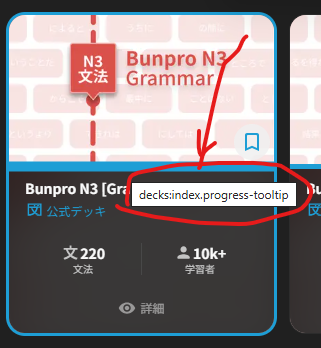
Is it intended behaviour?
2 Likes
Oops, it should show the like Learned: 220 / 220 (100%) but it’s only available in English at the moment. We’ll update the translations soon.
2 Likes
Nice! This is exactly what I was waiting for, and I’ll switch back to the Beta version immediately 
4 Likes
For a colorful cherry on the cake, it would be great if the progress bar could change color when the deck has been “completed”, as on the original decks page!
5 Likes
When importing into a deck, it’s a bit annoying that you can’t see at a glance what reading some Kanji words have been assigned (by Bunpro/the database). For example, 顔 was imported and flagged as yellow to check. Great, but then I have to click into it manually to actually see what it’s set to and if a change is needed before clicking back out and hitting the green tick. For a few words this is fine but when you’ve got a lot of words it really slows things down. Where it shows the English word might be a good place to put the reading in Japanese.
3 Likes
Not sure what everyone else uses, but for more obscure manga content without pre-made decks on other sites, Claude has been insanely useful. Spend some time getting it to make a custom Skill so that it produces the results you want in the way you want, and it’s very powerful. I’ve been playing around extracting vocab from some hard copy manga and books I had lying around. Coming from ChatGPT it’s night and day 
1 Like

woops yeah i did, sorrry! the new pin threw out my muscle memory
2 Likes
When importing into a deck, a filter function to quickly find and deal with yellow/red entries would be nice (hiding green for example).
2 Likes
Would it be possible to sort the added words by jlpt ?
For example n5 to n1 than a1 to a20 then the rest ?
I started doing it manualy but it’s not sustainable …
Or maybe there is already an order setting I missed ?
The A1-A20 decks aren’t in any particular order, though. Since they’re writing sentences for them in the order of A1-A20, that creates weird cases where words in the top 100,000 by frequency are getting sentences before words in the top 10,000.
There are common words/yojijukugo not in A1-A20 decks too, though I can’t find examples off the top of my head.
Yes, I woudn’t care to have to those stil random behind at least the N5 to N1 sorted in order.
Though maybe I am overthinking it as I will study all those vocab anyway so the order is not really a provlem.
Would still be nice to have it as I do like properly ordered list haha