
It was not alphabetical order, and it still doesn’t show from Lessson 1
Should be fixed now properly. Script I ran to fix your accounts had some wrong logic.
Updated my original post too!
Now that I’ve changed the review type of each my decks, the usability issue is mostly resolved.
However, that “change review type” button on iOS still has a really high error rate.
It was not obvious to me how to change the review type of each deck on iOS, or that I needed to change the review type for each deck when I had changed my global review type.
2 Likes
Is there an ETA for this by any chance?
1 Like
@Flandre5carlet
The next week! It will be in the update with other bug fixes.
Sorry for the inconvenience!
2 Likes
As I noted here, something really weird has happened. I am positive that at some point in the past week, I received notice through some official channel that the Android app now has home screen widgets. I cannot for the life of me figure out what that channel was (so I’m reporting my issue here). But I was very excited to try the widget, as I’d been wanting one for ages.
My very first thought was: darn, I wish that clicking on the widget took you to the app dashboard rather than straight into a review session. But oh well, that’s just a minor annoyance.
Now a few days later, I’ve realized it’s more than a minor annoyance. Incoming bug report:
Sequence 1: the sane case
- Open app from normal shortcut
- Start a review session
- Switch apps, do some other stuff in a different app
- Tap the normal shortcut again, and immediately return to your preserved review session. Good!
Sequence 2: the bug
Do everything the same as above, but in step 4 tap the widget instead of the normal shortcut. Your in-progress review session is instantly destroyed, lost, and a new one is launched. 良くない!I sadly lost many completed (but not yet reported) reviews in figuring this one out. 
2 Likes
Hey!
Looking into this, could you DM me which of the widgets are you using?
EDIT:
I found the issue, working on the fix! Should be available next week!
EDIT2:
Got this issue fixed 
Also, reviews are never lost, as each time you submit the answer, the progress is saved on the server
3 Likes
Can confirm, all fixed. Thank you for you hard work as always!
2 Likes
It hasn’t happened again, only on the 11th.
1 Like
Hi there! Today I noticed on the webpage that almost all audio starts after 3 seconds or so only, the beginning is cut off. When I replay the sentence, it starts from the beginning.
Noticed it before too, it seems to come up time and again.
1 Like
Hey @discopatrick
Looking into this, would it be possible to make a short recording and send it to [email protected]?
Hey @magnus1
Will be trying to reproduce it!
1 Like
すごい。。。ありがとう! 
Well, unless you’re insane like me. Part of my normal review flow is after getting a question right (or wrong), but before clicking the little “proceed” triangle at the bottom right of the screen (which I presume is what actually sends the result to the server), I often copy the entire sentence (sadly I have to use OCR tools here since my “allow copy from review page” feature request has gone long ignored) and then switch apps to a browser so I can have a conversation with an LLM about the sentence and ask way too many questions. With that flow, the bug was preventing my progress from being submitted.
And further, it appears if you have a number of review items at the same level, sort order for those items is nondeterministic, meaning that when I start a new review session after the bug is triggered, I can’t simply reenter my previous answer to recover from the bug, because that question is now buried somewhere else in the current stack of same-level items. But no big deal… this just means more free forced practice for me.  And also a moot point once your bugfix rolls out. Thanks again for the quick response!!!
2 Likes
Hello, I’ve noticed some issues that has recently appeared on iPad this week. Previously the input controls have been fairly stable the year when I’ve used it with my keyboard case both when I’m doing reviews and I get an answer incorrect. Now for example if I’ve typed the English wrong previously what I would do is I would just select all and click backspace to delete all of the written text but now what happens is, I select all, click backspace and it only deletes the previous character. this also seems to happen with the standard iPad input method it’s not exclusive to the folio case.
I hope this helps😊
2 Likes
@Oxen
I am fixing this right now, this is related to the ‘undo’ setting that lets you remove the last character/whole sentence.
EDIT:
It is fixed, we will release it with the next update.
@The111
Will do something about copying the sentence! Sorry for the inconvenience and thanks for the details.
3 Likes
Wow amazing thank you! One reason it irks me that you can’t copy from the review screen is that there was a brief period where you could copy from a cram session (or some other session that resembled a review, I can’t entirely remember), so it appears like the support was there. My old solution was to jump to the lesson, scroll to the sentence, and copy from there. Which doesn’t always work because some review sentences are not present in the lesson is an example (though this is pretty rare). But recently I realized I can use Google Lens OCR which is pretty damn fast and also solves that rare case mentioned above. I still look forward to a proper copy button, but the OCR is a pretty nice workaround in the meantime. Thanks again!
1 Like
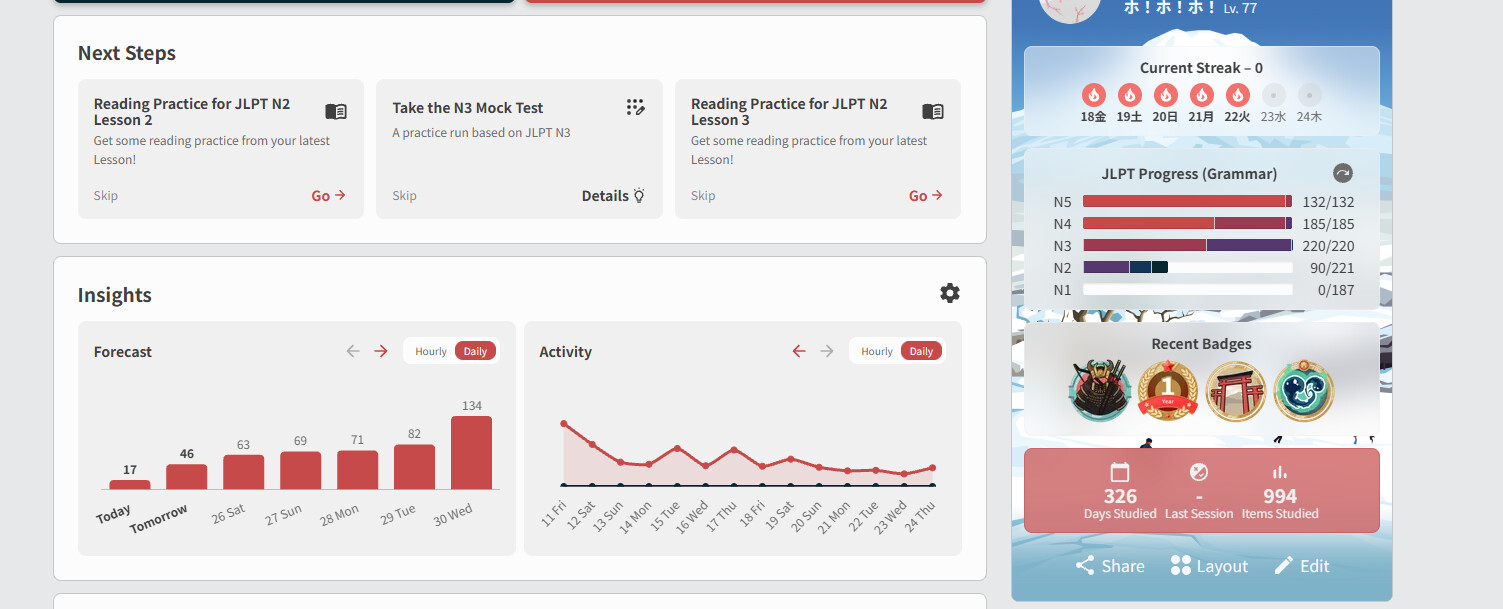
Mine too. Streak doesn’t apply if i clear words
1 Like
@Ckerk1856
Hey!
I believe I have fixed the cause of the problem!
The patch will be released next week!
2 Likes
Ok it seems the way I thought it is reproducable is not consistent. Today the black screen just appeared without switching apps at all, just transitioning between decks with the “continue with…” button.
2 Likes