
A tinder like feature to filter out vocab that you already mastered, it’s tedious with the current vocab panel
2 Likes
Any chance we can get an update to offline/online resources? To my knowledge we are still using Genki V2 pages despite the update some years back and for at least the official bunpro quartet grammar book the pages are not in their at all.
(I would also like to request the ability to add personal books if possible of even a community section?)
Responding to my own feature request here. For 8 months, I’ve had a workaround for the “unable to copy the review question text” problem (Android app). I would jump to the lesson and find the example problem there, where copying was possible. It wasn’t convenient, but it worked. Tonight for the first time ever I encountered a review sentence which was not an example in the lesson… meaning it broke my workaround.
So… one more plea for the ability to copy from the review itself. 
Thanks! Do you know if the same option exists on the Android app? I can’t find it and it didn’t sync the settings with the web app.
Doesn’t look like it’s in the App yet. I’ll pass it along to the mobile dev but it probably won’t be added for a little bit as there’s some higher prio stuff getting worked on, but thanks for bringing it up!
1 Like
The Cloze UX is really poor. I wish the hints distinguished between:
a) grammatically incorrect
b) grammatically correct, but wrong nuance/politeness/usage
c) grammatically correct and correct usage, but asking for a different item.
At it’s core the Cloze system asks the user simultaneously to:
a) Select the appropriate grammar point.
b) Select the correct nuance.
c) Conjugate it correctly.
d) Select the correct synonymous grammar point.
Some of these have to be constrained in the question, otherwise I’m just hopping through hints. At what point do I mark a question I got eventually correct, but with hints wrong? Even if I am cycling through hints, that doesn’t actually test whether I understand the nuance/politeness of the grammar.
Having a blank box to type into is useful because you cannot just reverse engineer an answer like in Duolingo, for example. However, most textbooks don’t test grammar points like this. They usually test conjugation, or correct usage, or both at once in highly constrained settings.
I think the Bunpro UX would benefit from a separating out the “selection” of the correct grammar point/nuance/politeness and the conjugation like many textbooks do.
The search function could be better. When I type no or の in the app I don’t see the grammar topics の. Instead I see, もの、だれ、上で etc. Even after scrolling all the way to the bottom, it’s not there. I started thinking it wasn’t included which I found disappointing. But then I go to N5 grammar and it’s right there? Why didn’t it show up when i searched it? It’s really annoying when I’m looking for a particular grammar point to go through.
1 Like
So in the JLPT vocab decks, I get the feeling that a lot of the words aren’t necessarily words that were asked on the JLPT, but words that were introduced as part of an educational passage for the reading comprehension section. I was doing an audit of the lower-level decks and noticed some very surprising vocab in N5. One that jumped out to me as being the topic of an essay and not actual vocab was “halal meat.” Like, I can’t imagine any teacher in 1-2 year Japanese putting that on the board, but I absolutely have read passages in the essay portion of practice tests explaining things like that, that might be considered culturally interesting for the test taker. Being a katakana term it’s probably not a great example of being out-of-level, but it feels like an indicator that the definition of “was on the N5 test in the past” is being used very loosely. There are definitely some words in N5 that feel more appropriate for N3 or N2, but I don’t have the time to go back over the list to pick them out. The N5 list feels like a comprehensive list of all the words I knew when I passed 2-kyu 20 years ago.
Would it be possible for someone to go through the lower levels and do a gut-check purge of words that might be used for flavor in lower-level exams, but which the test taker isn’t exactly expected to know?
1 Like
Feature request: an on-site drill mode specifically for nuance differentiation between grammar points that learners have already unlocked. Something like a “contrast practice” feature where users can study and get tested on sets of similar or easily-confused patterns.
Example sets:
Marking durations
中(ちゅう)
中(じゅう)
間(あいだ)
Obligations
なくてはいけない
ないといけない
なければいけない
A feature like this would help reinforce subtle differences that don’t always stick through normal SRS exposure alone. Being able to drill these side‑by‑side would make the nuances much easier to internalize.
8 Likes
If you go to one of the grammar point pages and then scroll down to the related grammar section, there should be a “Quick Cram” option. If you select that you are able to do a Cram session consisting of similar grammar points.
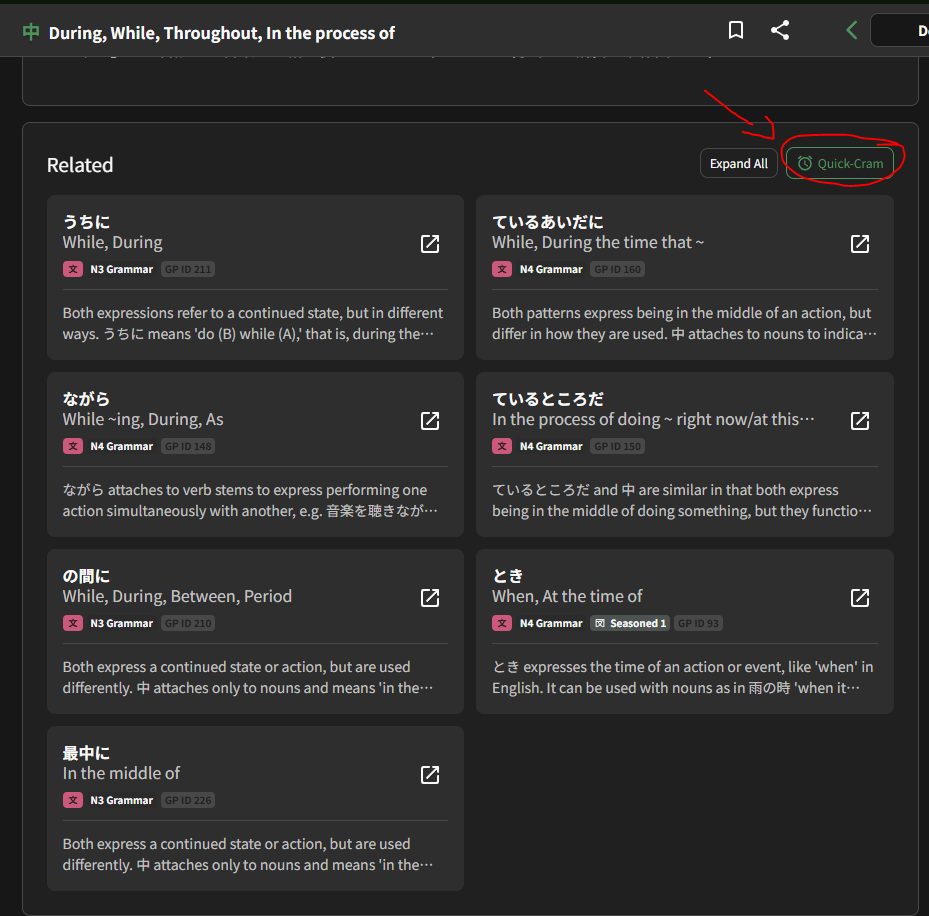
Is this the sort of thing you had in mind? Or did you mean an even more specific sort of testing mode?
4 Likes
Summer b point shop items please 


2 Likes
Maybe it is… I’d best give it a try
1 Like
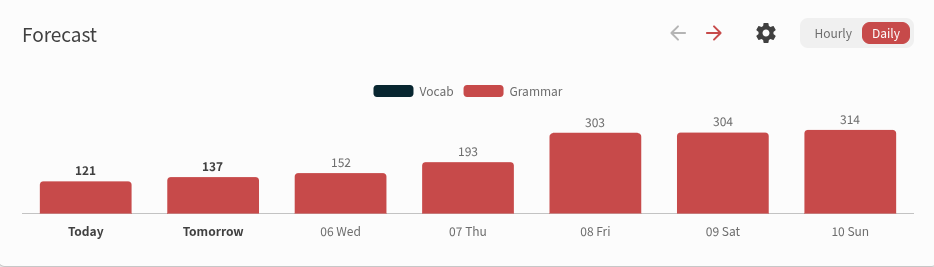
When I started bunpro last September, since I already knew well most of the N5 grammar, I added in the review queue in one day, but I get days like this upcoming friday every so often. Would it be possible to add some fuzzing at higher levels? When reviews are sent 4 months into the future, I think it make no difference between [3 months 29 days] [4 months] [4 months 1 day]. It would not totally remove the bump of a large addition, but it would smooth it over time, even with a simple 1/3 a day before, 1/3 a day later, etc etc. Anki has a similar feature that also target the day with the less reviews iirc, but that’s bonus tbqh. I use the daily review queuing timing.
1 Like
Is there any way to make cards bigger (easier to read and use) on mobile review? I feel like the text and buttons are unnecessarily tiny.
I’ve included a screenshot of what the cards currently look like, and how they could look making more use of the available space.
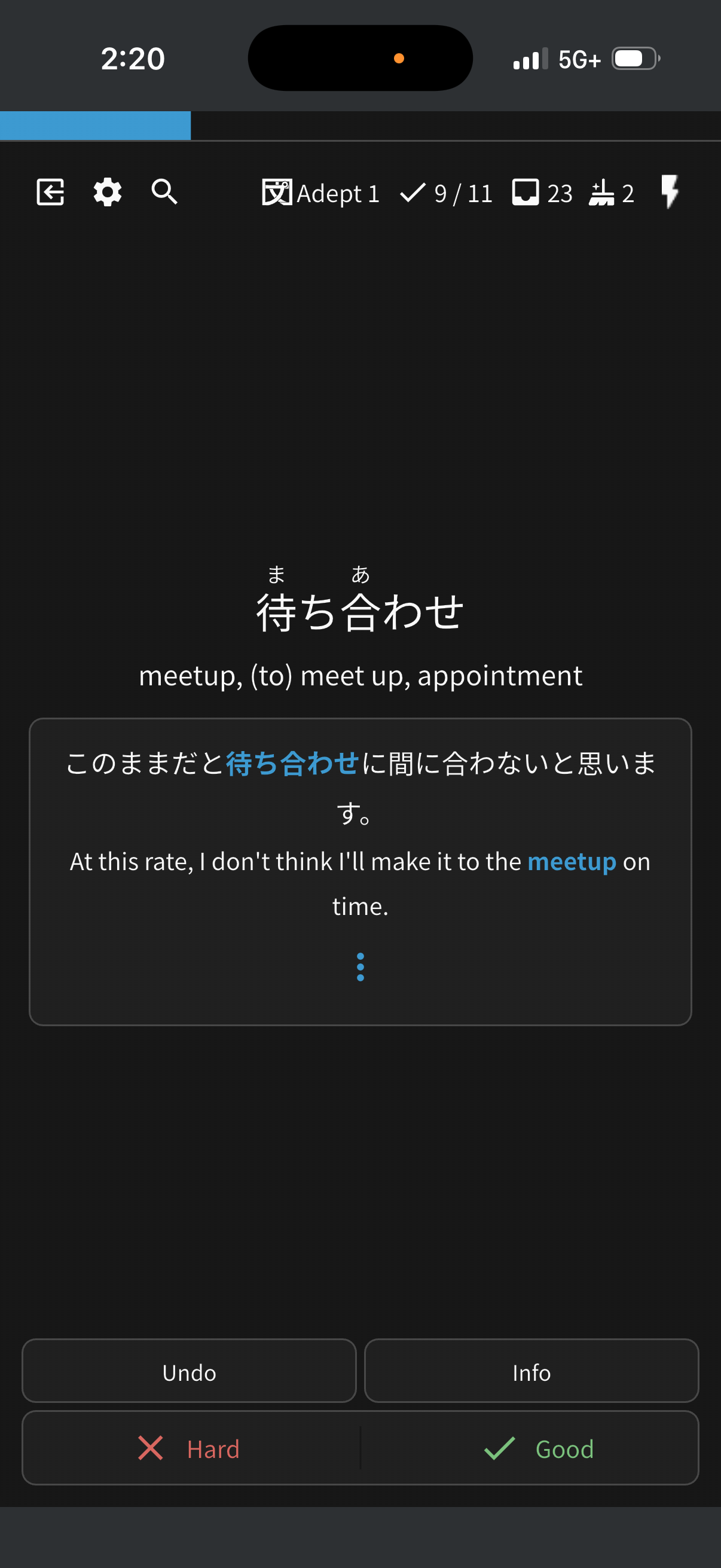

7 Likes
I wasn’t able to find this, please excuse me if this is a duplicate.
Feature request: Would it make sense to have a finer separation within the “special” category in Cram section between vocab and grammar? Some sections, like “recently learned” still combine the two, which is less flexible, since most times I want to focus on grammar. Today, I have to click through all grammar points individually.
1 Like
Probably already mentioned, but…
Wouldn’t be a brand new feature, but reviewing something that already exists:
There are some words with very similar meaning, that I personally have a hard time distinguishing why they can’t be used in some sentences.
I can provide a bunch of examples, but lets say:
周囲 x 周辺 x 区域 x 地方 x 地域 x 地区 x 付近 x 辺 x 土地 x 周り x 隣 x 地帯: all describe a “location”
Or
嫁 x 妻 x 家内 x 奥様/奥さん x 婦人 x 主婦 x 夫婦: all have a general meaning of “wife”
When using a similar word, show this warning with why word X can’t be used in the sentence.

4 Likes
Hey!
It’d be nice to have direct access to the corresponding reading passage from each lesson page. Right now it feels a bit disconnected and I often just forget about them.
I think it would flow more naturally this way, even just as a collapsible section.
1 Like
Is it just me or is there no way to add a vocab item you’ve searched up to a deck on mobile?
I would really like this feature in the future since I often look things up on mobile when I’m reading but I cant add it to a deck so I have to bookmark but then my bookmarks are in no particular order and I can’t search them by date bookmarked or anything so it’s a pain to go back and try and find the things I wanted to add
1 Like
- Option to hide the english translation, so the question card is purely japanese.
- Option to redo the current card when we get wrong immedtiately, but that redo doesnt count towards the srs, its just rebuilding memory muscle. Right now undo and redoing counts towards the srs i think.
This is already in settings!
It doesn’t:)