
Summer b point shop items please 


2 Likes
Maybe it is… I’d best give it a try
1 Like
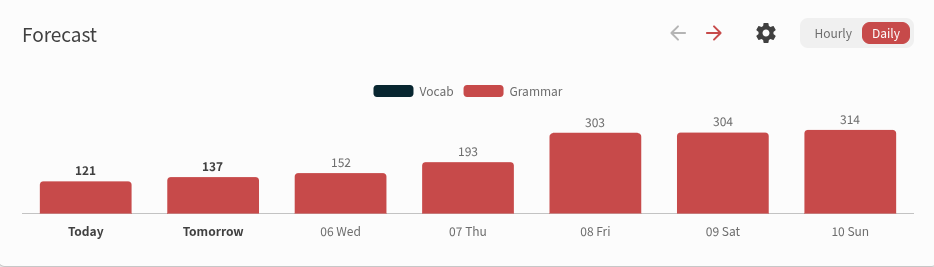
When I started bunpro last September, since I already knew well most of the N5 grammar, I added in the review queue in one day, but I get days like this upcoming friday every so often. Would it be possible to add some fuzzing at higher levels? When reviews are sent 4 months into the future, I think it make no difference between [3 months 29 days] [4 months] [4 months 1 day]. It would not totally remove the bump of a large addition, but it would smooth it over time, even with a simple 1/3 a day before, 1/3 a day later, etc etc. Anki has a similar feature that also target the day with the less reviews iirc, but that’s bonus tbqh. I use the daily review queuing timing.
1 Like
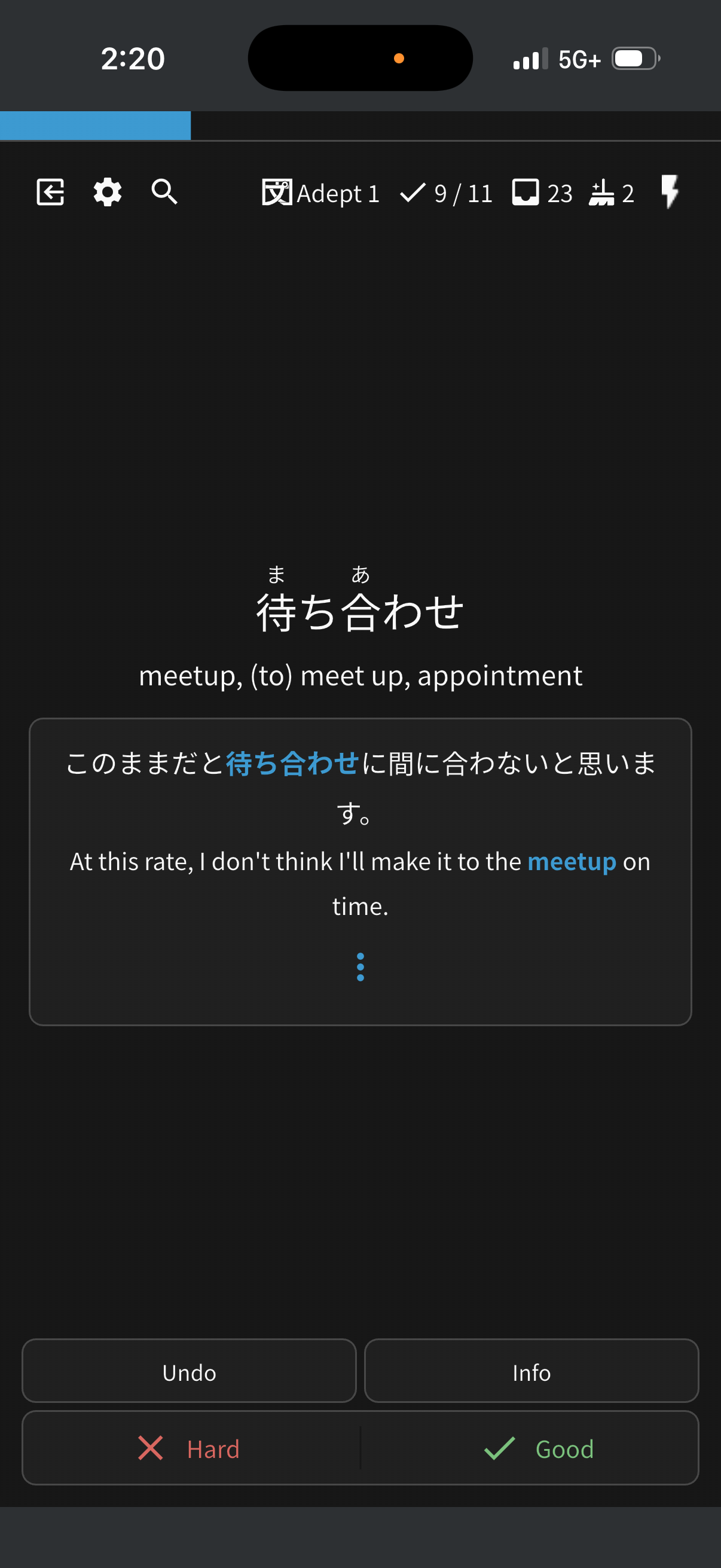
Is there any way to make cards bigger (easier to read and use) on mobile review? I feel like the text and buttons are unnecessarily tiny.
I’ve included a screenshot of what the cards currently look like, and how they could look making more use of the available space.

7 Likes
I wasn’t able to find this, please excuse me if this is a duplicate.
Feature request: Would it make sense to have a finer separation within the “special” category in Cram section between vocab and grammar? Some sections, like “recently learned” still combine the two, which is less flexible, since most times I want to focus on grammar. Today, I have to click through all grammar points individually.
1 Like
Probably already mentioned, but…
Wouldn’t be a brand new feature, but reviewing something that already exists:
There are some words with very similar meaning, that I personally have a hard time distinguishing why they can’t be used in some sentences.
I can provide a bunch of examples, but lets say:
周囲 x 周辺 x 区域 x 地方 x 地域 x 地区 x 付近 x 辺 x 土地 x 周り x 隣 x 地帯: all describe a “location”
Or
嫁 x 妻 x 家内 x 奥様/奥さん x 婦人 x 主婦 x 夫婦: all have a general meaning of “wife”
When using a similar word, show this warning with why word X can’t be used in the sentence.

4 Likes
Hey!
It’d be nice to have direct access to the corresponding reading passage from each lesson page. Right now it feels a bit disconnected and I often just forget about them.
I think it would flow more naturally this way, even just as a collapsible section.
1 Like
Is it just me or is there no way to add a vocab item you’ve searched up to a deck on mobile?
I would really like this feature in the future since I often look things up on mobile when I’m reading but I cant add it to a deck so I have to bookmark but then my bookmarks are in no particular order and I can’t search them by date bookmarked or anything so it’s a pain to go back and try and find the things I wanted to add
1 Like
- Option to hide the english translation, so the question card is purely japanese.
- Option to redo the current card when we get wrong immedtiately, but that redo doesnt count towards the srs, its just rebuilding memory muscle. Right now undo and redoing counts towards the srs i think.
This is already in settings!
It doesn’t:)
This is also something I’d love to see improved. Sometimes I have trouble reading text and as you say, the buttons on the bottom are small relative to the amount of free space available.
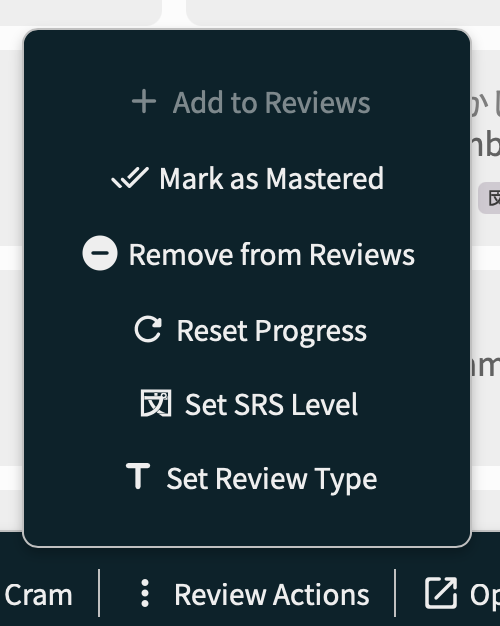
A “Remove bookmarks” option is missing on the Bookmarks page when using the select items feature to select multiple items.
1 Like
hi are you sure on the undo and redoing not counting towards srs? the posts i googled and found says it does though…
1 Like
Hi! My apologies, I misinterpreted your post. I meant it doesn’t count negatively towards the srs! But I realise now that you meant you don’t want it to change your SRS positively either.
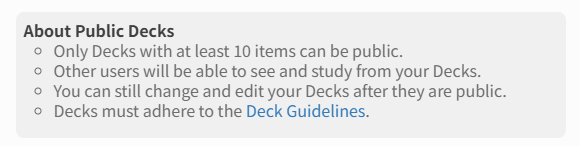
In regards to public decks, I do know there are no strict guidelines around that yet, but it would be great if on the modal window there could be a hyperlink to at least some sort of guidance on general rules, like this:
1 Like
I’ve returned after a few months not using Bunpro. I’m AMAZED at this feature here:
It is SO SO helpful!! It’s something I always wanted each time I would answer wrong. It’s been awesome!
My feature request is: I use the hover for furigana mode (or tap on mobile). And hovering does not make the furigana appear. That’s the request!
Thank you!
2 Likes

1 Like
First of all I love the website you guys did a great job. I wonder if you guys have any plans of making a version where you actually write out the sentences instead of the cloze system we have in Bunpro like a hardcore mode in a sense. I find myself struggling to construct sentences so it would be nice to have a platform so i can practice. Thank you again!
So the premade decks are great but is there a way we can have the option to move deck items around for the pre-made? As in, finishing up Quartet here in a week or so and the last several chapters all the items are out of place in regards to the book. Would be nice to move them into the proper order myself
(or to do a site wide doublecheck)
without having to go to the book page, add them to my reviews, AND THEN study them in the review page. Thanks for your continued hard work
In fact, immediately after writing this, the book shoves 3 separate grammer points into one, while the official bunpro book only has one of the three listed, but then expanded another separate grammer point, into two separate points.
aka Quartet Chapter 6 has
① ~(とう)わけではない
②からみると・からすると・からいうと
But then the official Bun has
①わけではない
②とうわけではない
③からみると
with no mention of the other two forms すると・いうと