
Hmm, community is basically Discourse, and it relies on your browser settings for that. You might want to look into that, I have spell checking when writing here!
I see what you did there and totally agree that a speel cheek would be rely nise! 
3 Likes
I dont know if any of this has been suggested yet, but since my switch from anki to bunpro there have been some things that I keep on missing a little and I just thought I’d put them out there. ^^
I’d love to see an option to review vocabulary from English → Japanese instead of Japanese → English.
What I have in mind is something like:
- the English meaning/definition
- hints for the word class (noun, な-adjective, etc.) and register (formal, casual, etc.)
- an example sentence for context
Then you’d have to recall and type the Japanese word.
Personally, I don’t get much out of the current English-side writing prompts. Typing the English meaning just feels like extra time without really helping me remember the Japanese word. Generally to me, Japanese → English doesn’t seem as helpful for active recall, as would English to Japanese be.
One of the main issue is also with vocabulary that doesn’t have fill-in-the-blank example sentences. Those switch to the translate-to-english mode by default, and I can’t switch them to flashcard mode because that setting also changes my fill-in reviews to flashcards, which I don’t want.
It would be great if there were either:
- an english → japanese review mode for these cards
or - separate settings for standalone vocabulary cards and fill-in-the-blank sentence reviews.
I also have a bit of a smaller issue with the fill-in sentences, since I am more auf an audio-visual learner, it would help a lot if there was an option to play the vocab audio before/separately from the sentence audio in fill-in sentence type reviews.
This would help a lot. (Please also let me know if there are features like this and I just didn’t find any of them)
If I may be so cheeky I’d like to offer two suggestions here:
- some way of quickly cramming the daily goal (including no. of times an item appears in the cram).
I’m finding this to be the best way to solidify newly learned points; a quick cram with a repeat of 2 or more after completing the daily goal
- Auto-download offline data
An small QOL admittedly. Just a toggle to keep reviews ready for offline use. Bunpro comes with me camping/outdoors  so its the perfect "oh, no signal for doomscrolling? Bunpro time
  " sorta detox
4 Likes
I’d love to use the cram feature more, but currently, I feel like the filter methods are lacking.
What would be really helpful, is a way to cram the items from your last review, i.e.: “Cram all missed items from last review” and “Cram all items from last review”.
Also, another filter where you can just select all items from a specific progress-category would be nice, e.g.: “Cram all ‘Beginner’ items”.
4 Likes
The date that shows when I completed a mock exam shows the month first. Is there a way I can change this to day first instead?
Going to offer my support to this idea here. On the “Learn” option it should test 3+ sentences to solidify understanding for each grammar point. Then have all the learned grammar points mixed together in a test. This would feel like a textbooks structure where you’ll learn the conjugation, then develop from there.
Bunpro becoming a really good textbook with SRS would be good in my opinion.
3 Likes
Not sure if has been suggested by the ability to “balance” long-term reviews. Say you have 150 reviews one day, and 50 the following, an option to balance this out so that instead you have 100 for two those days instead.
For long term reviews, seeing a review 29 days from now vs 28 probably does not matter and it might help with feeling overwhelmed by having too many reviews in one day.
It would be nice to have diagrams/tables of how similar grammar points link and their differences, especially in the context of hints. It would be helpful to understand the relationships directly in one place.
1 Like
Hi Bunpro community and Bunpro team,
Thanks for the amazing work on this fantastic tool  .
.
To reiterate an early suggestion from @ddavo, it would be nice to have a MCP, or otherwise APIs, to expose data, such as recently failed items, lessons and decks covered so far, and stats. I was trying to create a Claude skill to improve my Jp practice, but I’m clutching at straws for a way to automate my Bunpro data inflow in real time.
If there already is something along these lines, or otherwise a workaround, please do share!
3 Likes
Same hah. It’s a bit of a pain feeding it updates manually. Best I’ve come up with is making a script to add an export grammar button, then uploading that for it to decipher and update my repo.
2 Likes
I don’t know if this was suggested before (and I am sorry if it was), but I would be happy if we could get more mock exams on Bunpro
I’d like a way to know how many new items I added on a given day.
Some time ago I switched from queuing vocab with the default deck order to manually adding vocab relevant to my current interests (unknown words from the anime I’m watching or book I’m reading). It really helps with retention as those are words I’m likely to hear again soon and have more context for, however it also means I’ve no idea how many of them I’ve added at the end of the day, which sometimes results in unwelcomed surprises a few days later in the form of a tremendous amount of reviews. Having a way to monitor that would help me go “Nah, I’ll just add this one tomorrow instead”
1 Like
You can see that in your stats
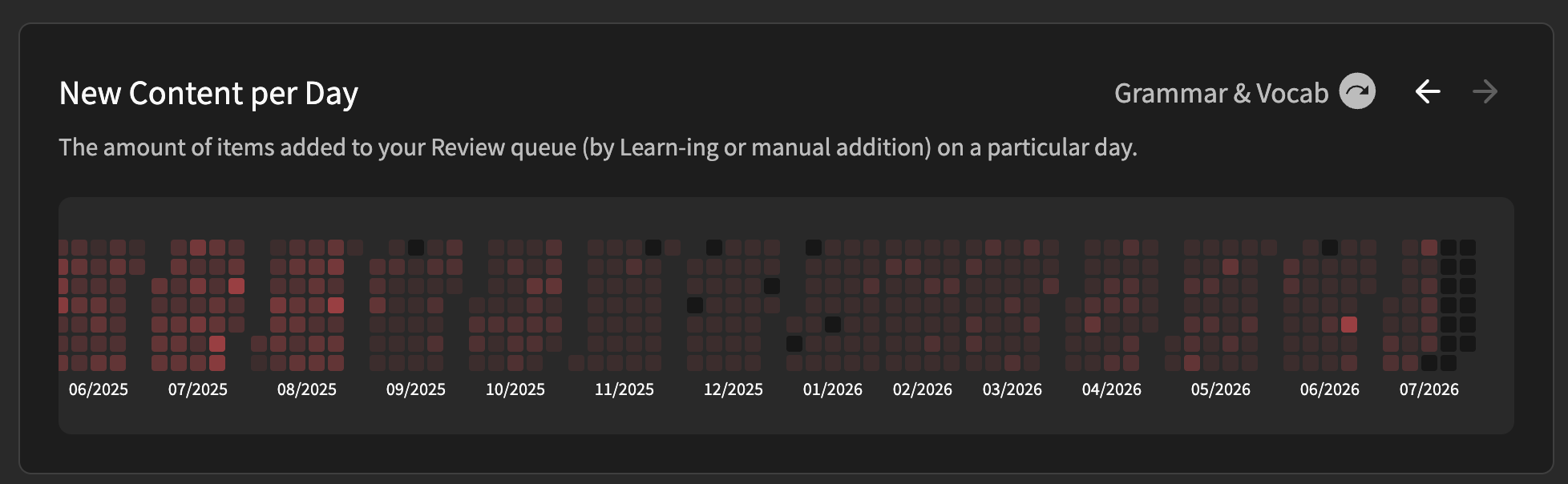
if you pass the mouse over each square you will see how many items have been added each day.
1 Like
iOS app suggestion/feature request:
- Add separate toggles for Japanse font-size and English font-size, if possible.
When doing reviews outdoors or on the go, I usually need the kanji to be a bit bigger to be eligible, but there is no use to disproportionately size the English text (and menu/dashboard) as well.
2 Likes
Please can you add “Poor Hint” or similar to the feedback/bug report section? This is pretty much 90% of what I want to report.
4 Likes
A shadowing feature, where for a listening review, I can record my own voice to practice pronunciation and compare it to the native speech. Plus points if there’s some robust pitch accent comparison provided too.
7 Likes
I think that each grammar point could benefit from having a replacement for the Register section.
The register should, of course, be in there, but I think a section for “how you’ll see it” would be more beneficial with sub categories like:
-Register (keep it as it is)
-Mode (Use keywords rather than just writing/speaking. Things like “in a text”, “in a newspaper”, “talking with friends” or “in a speech”)
-Core nuance (stoic, emotive, etc.)
-Commonality (just a rough estimate as to how often you’ll see this grammar in various types of media)
I understand this section would be a massive project to create, but a boy can dream!
1 Like
SRS for Self-Study Sentences
Not sure if that is a thing already but it seems like the self-study sentences are not included in the SRS system?
It’s a bummer since the grammar that’s associated with it is often long gone in the further SRS cycle, but the self-study sentences are still in full rotation.
Maybe I just set somthing up weirdly, but that’s what I’ve noticed (or if it’s the case, then it’s not really easily understandable, because it doesn’t show the SRS level for self-study sentences).
I encountered a new Grammer point that I couldn’t find in bunpro, I would like to see it added if possible!
From the book 新完全マスター 文法N1 page 21
〜といい…といい
Meaning: 〜を見ても…を見ても同じような状態だ
例文:
庭といい玄関といい、ゴミだらけだ
この虫は色といい形といい、木の葉にそっくりだ
この映画は映像の美しさといい音楽の素晴らしさといい 、最高の作品だ
水泳といいテニスといい、スポーツはみな楽しい
注意:同じ意味のグループに入る例を並べる。後には、状態を述べる分 (話者の評価を述べる形容詞文など)が来る。話者の希望・意向を表す文や働きかけの分は来ない
1 Like