
It would be nice to have ability to cram items that have less than x% of correct answers or at least to be able to filter + sort by correctness option. Currently there are only filters by level, but I think sorting would help to navigate over items slightly easier.
Can you eliminate the excess spacing with hidden furigana? For example, when I see 企 てる, my brain picks up on the extra space and leads me to the correct pronunciation. I think you can probably just change it from display: hidden to display: none as an easy fix.
In the Cram screen, there’s a tab, “Special”. It has “Troubled Grammar” and “Troubled Vocab”, but I think they’re items at 50% or below. It would be really nice if you could adjust that value yourself.
1 Like
Can we get an improved “troubled content” section? It’s been quite ineffective in the current state. It will just show ~1 item at a time, often recently learned, and not the actually troubled content (which keeps going up and down in the SRS in a loop)
For example, it would be great if items could be tagged by total attempts. Something with a 80% accuracy, but 100 attempts and never mastered would be “troubled content” because this can indicate a failure in long-term retention.
5 Likes
More seasonal b points shop items please 
And OLED black theme would be great too
2 Likes
A lot of the vocab review translations aren’t very learner-friendly. At “N4”, it seems counterproductive to expect someone to memorize and learn every nuance of a word ranked as Dictionary Top 25,000.
It just seems like a lot of them are difficult just for the sake of being difficult, not really to help learning. So I guess my suggestion is for them to not be like that?
4 Likes
In the Android App, could you implement the option to add/modify custom decks, so that they can be used for cram?
Currently, I have to use the web app (PWA) on my phone to do this (in general, my custom decks are not displayed in the Android app)
1 Like
This is the biggest issue with Bunpro, it’s very brutal on the example sentences not building on top of each other, and using words from all over the place. I’d like to see this improved. But, if you can take it by the horns, it’s quite great.
Personally I wouldn’t put too much weight on a word having a low frequency or being a higher JLPT level than you’re currently studying, unless you’re really struggling with remembering the words. There will always be words you won’t understand, if you can get accustomed to the uncertainty it’s much more representative of real-world Japanese use.
1 Like
Hello!
I have no idea if this question has been asked before, and if it has, I apologize.
When I do my reviews on the iOS app, the grammar points I get wrong reappear quite quickly during the session, and I really like this system. However, on my computer, all the mistakes only reappear more or less at the end.
I was wondering if there is a way to set it up the same way on a computer?
Once again, sorry if this has already been answered or if it’s in the wrong place.
4 Likes
@Makishimu
Hey, we will be making this the same for website and the mobile app with the next update 
@PeppenDerReiter
Hey, the cramming option will be added with the next update! Cheers 
5 Likes
more phrases for the same grammar point, otherwise we learn that one phrase and that’s it. Not very useful as it is.
Welcome to the forums!
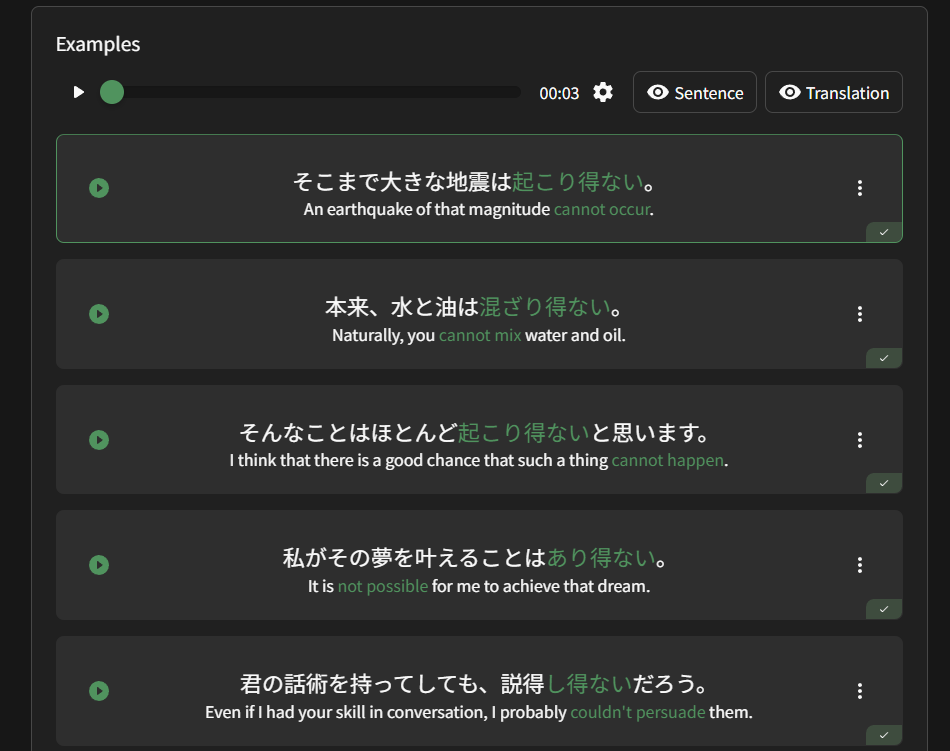
Besides the examples in the grammar writeups themselves, all grammar points should have 12 example sentences (these are used during reviews, so you should be tested on all 12 when using the SRS). We are actually adding even more sentences for lower level grammar points as well.
You can find these sentences by scrolling down to “Examples” on any given grammar point page.
1 Like
This is actually really good advice. If we’re being real here, my issue isn’t with the difficulty of the translations. It’s that, if I get a single review item wrong, then I’m the dumbest person alive, completely worthless, will never amount to anything, and no one will ever love me.
So maybe I can just chill instead of expecting the Bunpro team to rewrite 10,000s of example sentences to accommodate my insecurities.
2 Likes
I’ll still love you even if you get a single review item wrong <3
Don’t beat yourself up over reviews. Every mistake in a review is a mistake avoided in real life, in a potentially more consequential area. The 10-30 seconds to do a review again is worth it. I find it easy to get emotional over mistakes too so I fully understand how you feel. I’ve just accepted (the way I do reviews) if I get a sentence wrong because I’ve not seen the word before, then I need to do the review again. This is much harder if you’re still learning your first several thousand vocab, though. If the default settings for Bunpro (lose one SRS level per wrong review is applied) it’s still easy to make progress, since this setting is pretty generous.
Also the new features which check vocab completion for each grammar point really help with this.
1 Like
Your original comment was on point. Many of the questions are unnecessarily difficult or misleading, which distracts from learning the grammar and instead focuses on learning Bunpro.
That said, I don’t think that Bunpro needs to ‘fix’ all these sentences. Instead, they need give us the ability to add a custom ‘hint’ to a question card.
1 Like
Hi! I want to suggest two new functions for decks:
- I want a feature to quickly add vocab from decks to my queue. Currently on IOs it looks like “scroll deck, open word, add to Reviews, go back to deck” and I want something like “scroll deck, long press on word, add to Reviews”. Usually I scroll and add, not learn, custom decks, so it would be nice function I think

- I want a new filter function for decks, not just Learned/Not learned, but “JLPT-N”. It would be helpful when you scroll, for example, Anime 4k Deck, and search for N2 words inside.
Thanks!
2 Likes
1 Like
Brought this up a few months ago, and every day I keep hoping to see a button to play audio associated with the N1 Reading Practices. N5 has it, so the functionality exists. Could this be done? お願いします。
I love everything else about Bunpro. If this were enabled, for me, it would be perfect.
1 Like
It’ll definitely be on it’s way!
I’m not sure on the timing, but yeah it’s coming
Thank you so much.
1 Like