Feedback - Bug Reports

Yes I believe it needs the “a”!
Fixed!

Thanks and have a great day

3 Likes

A very specific (probably event-trigger related) bug in the review UI.
If I type a number into the review limit field and click refresh session, it won’t use the new setting. However, if I click somewhere else in the UI before refreshing the session, it will work.

Browser: Firefox 145.0.2 (current version)

Click settings

image

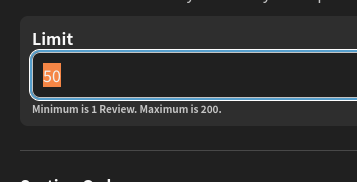
Type a number in the review queue limit
image

Click Refresh session
image

=> nothing happens, the queue length is the old number

However

Click settings
image

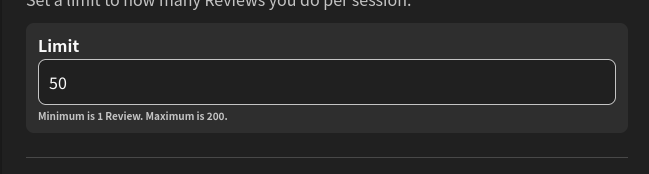
Type a number in the review queue limit
image

Click anywhere else on the queue settings UI to remove focus from the Limit input field
image

Click Refresh session
image

=> it works, the queue length is now your new setting

According to the developer tools, leaving the input field (by clicking somewhere else) fires the following XHR request which is otherwise not fired, this is likely the issue

PATCH https://api.bunpro.jp/api/frontend/user
{"user":{"review_setting_limit":50}}
2 Likes

I am often seeing a vocab question pop up in “translate to English” style, only to open the details and see there are plenty of example sentences for the word.

So I went to my review settings to make sure that “cloze style” was chosen, and then “set all as this default” button.

But I’m still seeing a lot of cards as “translate to English”.

I always prefer cloze style as it gives me reading practice. So it’s a shame I don’t see it on these cards.

Incidentally these are cards I have not practiced in a long time due to my ordering settings. I’m not sure if that has an effect.

1 Like

I’ve been doing some vocabulary crams with ~2000 items in them and when getting towards the end I keep running into a crash with error

TypeError: Cannot read properties of null (reading ‘trim’)

which gets more and more likely as it gets closer and closer to the end, until the cram can’t even be opened at all. It’s as if there’s something wrong with a particular remaining item that causes a crash whenever the item comes up. On my account I have a cram down to just one remaining item and it crashes upon trying to open.

1 Like

Welcome to the forums!
Sorry, I did see your email, just was busy with some other stuff!

Will take a look at the broken session you mentioned.

UPDATE:
Turns out there was broken data (in the sentences).
I’ve fixed these now. Sorry for the delay, especially so close to the JLPT 🙇‍♂️

Fine catch! :ok_hand:

Will be fixed in a day or two!

1 Like

Not sure if it has been reported, but I study bunpro on the iPhone app, and on the browser on the PC.
And when I am on the phone if I open the decks tab, the decks have a counter for the remainder of the items I have left to review. But on the phone, I see the ghosts included and on the browser the ghost aren’t included on the count.
So if I have only 6 ghost pending of review from a deck, I see 6 reviews on the phone and none on the browser. And if I have several items to review on the phone I see the total number with ghosts and on the browser without them. If i have 4 reviews I would see 10 and 4.
Is something wrong on my configuration or a bug? (I prefer the mobile count as it groups the ghost with their reviews, and as I tend to have too many reviews at once, I can focus on a few decks until I decrease the amount. But with this bug, I can’t finish the reviews of a deck just from the browser unless i press the review on the front page and those are from all the decks mixed.
Ah, I have set bunpro to spanish, not sure if that is related, but just in case.

1 Like

Hi there! This is definitely not on your end. We tried to replicate the issue and have found the problem. Happy to say that we have applied a fix and will be out in the next update. Thank you very much for the bug report! :heart:

1 Like

Hi,

Since this morning, wrong hours are being displayed:


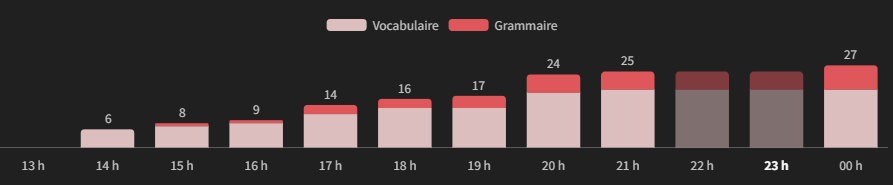
I’m in Paris (UTC+1) and the hours displayed are UTC (14 h instead of 15 h).

2 Likes

Seems like there is a memory leak or something going on in Safari: [ Version 26.1 (20622.2.11.119.1) ] on MacOS [ 15.7.2 (24G325) ].

I have Bunpro.jp as a pinned tab and if I don’t kill safari at least once a day I’ve seen it ballon as high as 6 GB of RAM usage according to activity monitor in the past week or so. I thought it was a fluke so I didn’t screenshot it the first time.

I’ve been going through about 25-100 reviews a day for the past couple weeks.

Unfortunately I don’t have any information/details about when this started as I recently switched to using my Mac for studying again after a couple month of mixed iOS/Firefox (Windows) studying after a long trip.

Went through a decent amount of reviews, missed a decent amount of reviews, got zero ghosts. Think I’m getting the same thing some people not too long ago in this thread got. I have “Grammar Ghost Reviews” On and “Minimum SRS For Ghosts (Grammar)” at Beginner 0.

2 Likes

Hi, thank you for reporting it!
The recent change to use the 24h format for some locales is definitely the cause.
I will take a look at it right away.

Edit: This should be fixed now! Sorry for the inconvenience! :bowing_man:

2 Likes

It’s fixed, but it created a side effect: new Novice 0 items reappear immediately instead of an hour later. I suppose everything is drawn forward by an hour, BTW.

2 Likes

tbqh, this wouldn’t be so annoying if there was a way to create ghosts from the results page. as long as this bug is here, though, I’ll probably be holding off on using the site, unfortunately.

1 Like

I have ghosts set to minimal + srs 0, so it’s harder for me to be sure (since i have to get it wrong twice in a row), but i think the only ghosts i ever see lately are the ones i created manually

1 Like

Big issue that started with the new quiz themes:

During grammar reviews (fill-in type), my browser tab lags, freezes, and one time glitched the lower part of the screen with horizontal lines. I’m on the latest firefox version for android, my internet speed is good too.

This issue makes the grammar reviews extremely slow, bc it takes a few seconds(!) for the kana to appear onscreen when i type, and it takes a while to grade when i tap to check

Problem doesn’t exist at all with vocab reviews (reading type). It also disappears when i unequip the quiz theme, and appears again when i equip it back (checked for repeatability)

Anything that could be causing it? or is it only my phone being weirdly overwhelmed :eyes:

1 Like

Just noticed it too. I just did my reviews. Missed 3. So I expected 3 more ghosts. Nothing. The timetable is empty.

2 Likes

Same here.
I had several wrong reviews during the last 2-3 days, but no new ghost reviews were generated.
Could you have a look at it?
Thanks in advance.

2 Likes

Hey there,

This issue has been going on for a while, so I turned to manually creating ghosts from the review page, which is actually something you can do :eyes: What I do is access the vocab/grammar page of each sentence I got wrong from the review summary screen and find the sentence I want to create a ghost for. Unless you get a staggering amount of wrong answers it’s totally something you can do my hand. I also tend to create ghosts for “interesting” sentences as well, directly from said-sentence review page.

To be honest, after more than a month of working like this I’m not sure I would go back to automatized ghosts creation even if the issue was fixed.

2 Likes

And on another topic entirely, I can’t seem to access the forums from the (Android) app ? Whenever I click a link in “Latest Community discussions” it still opens my browser but ends up on a full black page. Refreshing it does nothing.

Opening Bunpro on my browser and then accessing the forums from there still works, so I’m not sure if it’s a me issue or a Bunpro issue ? It only started yesterday during the afternoon if it means something.

1 Like